AI-Math
MATLAB Plotting & Visualization
Complete guide to plotting in MATLAB including line plots, subplots, matrix visualization, styling options, legends, axis control, and exporting figures.
MATLAB
Data Visualization
Plotting
Scientific Computing
Matrix Visualization
Engineering
Graphics
Plotting
- Plots Y against X
Line Specification
Line style
'- '	 Solid line (default)
'--'   Dashed line
':'	 Dotted line
'-.'	 Dash-dot line
Marker symbol
 '.'	 Point
 'x'	 Cross
 '+'	 Plus sign
 'o'	 Circle
 '*'	 Asterisk

 '^'	Upward-pointing triangle
 'v'	Downward-pointing triangle
 '>'	Right-pointing triangle
 '<'	Left-pointing triangle

'square' or 's'  Square
'diamond' or 'd'  Diamond
'pentagram' or 'p' Five-pointed star (pentagram)
'hexagram' or 'h'  Six-pointed star (hexagram)
Color
r	Red
g	Green
b	Blue
c	Cyan
m	Magenta
y	Yellow
k	Black
w	White
Plotting
    plot(x,y)
    plot(x,y, "r  *") // plot red * no line

    hold on      // plot on same Axis as before
    hold off     // plot on different axis

    clf       // clear figure
    close     // close figure

    figure(1): plot(x,y) // save a figure

    subplot(n,m,o) // divide plot in nXm grid and access o element
    subplot(1,2,1) // divide plot in 1*2 grid and draw in first subplot

    plot(Vector)  // auto plot Vector on Y axis
    plot(x,y,"red--o", "LineWidth", 4)
Limit
    xlim([n,n])   // limit x range between n & m
    ylim([n,m])   // limit y range between n & m
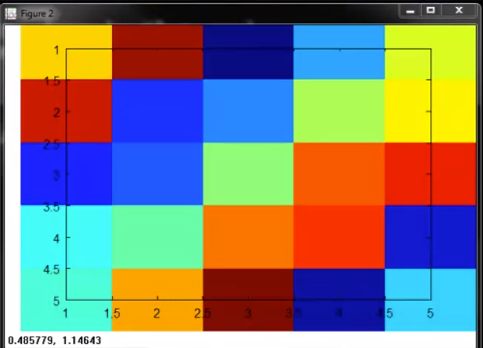
Plot Matrix:
Color Plot
   A = magic(5)
   imagesc(A)
Result:
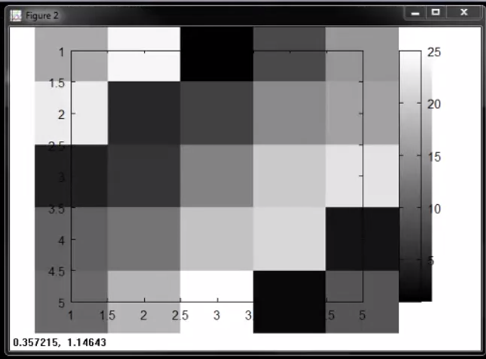
Grey Scale Plot
 A = magic(5)
 imagesc(A), colorbar, colormap grey
Result:
Legend:
    title('TITLE OF PLOT')   // Title
    axis([x1, x2, y,, y2])   // set axis range to x,. x2 & y1y2
    xlabel('X axis Label')   // X Label
    ylabel('Y axis Label')   // Y Label
    legend('plot1','plot2')  // Legend
    grid on                   // Grid enable
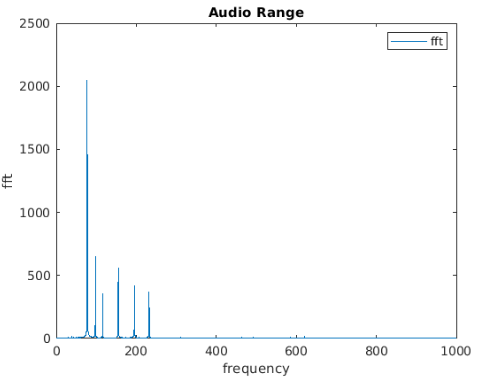
Example: FFT Plot
    plot(f, yfft)
    xlim([0,1000])
    title("Audio Range")
    xlabel("frequency")
    ylabel("fft")
    legend("fft")
Result:
Export Figure:
print -dpng "<image name>.png"