
Terraform Configuration Management
Master Terraform configurations: Learn how to read, generate, and modify Terraform files efficiently. Practical tips and best practices for scalable and maintainable IaC setups.
Terraform Configuration Management 🛠️
Read, generate, and modify configuration - 18%
- 8a Demonstrate use of
variablesandoutputs - 8b Describe secure secret injection best practice
- 8c Understand the use of
collectionand structural types - 8d Create and differentiate
resourceanddataconfiguration - 8e Use resource addressing and resource parameters to connect resources together
- 8f Use HCL and
Terraform functionsto write configuration - 8g Describe built-in
dependency management(order of execution based)
Variables
terraform apply -var "instance_name=YetAnotherName"
Local Variable
Used to define local environment configurations or constants
- keep the number of local variables to a minimum
- Instead use Input Vars as parameter to resource/module
Example
        locals {
        project_name       = "Terraforming"
        default_region     = "us-east-1a"
        common_tags = {
            Terraform   = "true"
            Environment = "dev"
        }}
Input Variables
Used to assign dynamic values to resource attributes as Input
- input variables allows to pass values before the code execution.
- usually stored in variables.tf file
example:
    variable "vpc_name" {
        description = "Name of VPC"
        type        = string
        default     = "module-vpc"
    }
Variables can be overridden using
-
Passing the values in CLI as -var argument eg
terraform plan -var "ami=test" -var "type=t2.nano" -
Using
.tfvarsfile to set variable values explicitly egterraform plan -var-file prod.tfvars- file with extension
.auto.tfvarswill autoapply without -varfile argument
- file with extension
Supported Variables types
Primitive Types: string, number & bool
object and tuple
1. Strings
    variable "string_type" {
    description = "This is a variable of type string"
    type        = string
    default     = "Default string value for this variable"
    }
heredoc style format
    variable "string_heredoc_type" {
        description = "This is a variable of type string"
        type        = string
        default     = <<EOF
        Hello World!
        EOF
    }
2. Number
    variable "number_type" {
        description = "This is a variable of type number"
        type        = number
        default     = 42
        }
3. Boolean
    variable "boolean_type" {
        description = "This is a variable of type bool"
        type        = bool
        default     = true
    }
Complex Type
1. Structural Types: object and tuple
4. Object
    variable "object_type" {
        description = "This is a variable of type object"
        type = object({
        name = string
        age  = number
        enabled = bool
        })
        default = {
            name    = "John Doe"
            age     = 30
            enabled = true
        }
    }
8. Tuple: fixed-length ORDERED collection of DIFFERENT data types.
    variable "tuple_type" {
        description = "This is a variable of type tuple"
        type        = tuple([string, number, bool])
        default     = ["item1", 42, true]
    }
2. Collection Types: list, map, and set
5. List: Collection of SIMILAR items/ objects
    variable "list_type" {
        description = "This is a variable of type list"
        type        = list(string)
        default     = ["string1", "string2", "string3"]
    }
List of Objects
    variable "list_of_objects" {
        description = "This is a variable of type List of objects"
        type = list(object({
            name = string,
            cidr = string
        }))
        default = [{
            name = "Subnet A",
            cidr = "10.10.1.0/24"},
            {name = "Subnet B",
            cidr = "10.10.2.0/24"},
            {name = "Subnet C",
            cidr = "10.10.3.0/24"}]
    }
6. Map: Key Value pair
    variable "map_type" {
        description = "This is a variable of type map"
        type        = map(string)
        default     = {
            key1 = "value1"
            key2 = "value2"
        }
    }
Map of Objects
    variable "map_of_objects" {
        description = "This is a variable of type Map of objects"
        type = map(object({
            name = string,
            cidr = string
        }))
        default = {
            "subnet_a" = {
            name = "Subnet A",
            cidr = "10.10.1.0/24"},
        "subnet_b" = {
            name = "Subnet B",
            cidr = "10.10.2.0/24"},
        "subnet_c" = {
            name = "Subnet C",
            cidr = "10.10.3.0/24"}
        }}
7. Set: UNORDERED collection of UNIQUE values(no duplicate possible)
    variable "set_example" {
        description = "This is a variable of type set"
        type        = set(string)
        default     = ["item1", "item2", "item3"]
    }
Dynamic Types: The "any" Constraint
serves as a placeholder for a type yet to be decided.
any is not itself a type: when interpreting a value against a type constraint containing any, Terraform will attempt
to find a single actual type that could replace the any keyword to produce a valid result.
    variable "settings" {
     type = any
    }
Using tfvars & *.auto.tfvars file
Used to define varaibles used in differeent env eg:
terraform apply -var-file="testing.tfvars"
Terraform automatically loads file with names:
- exactly
terraform.tfvarsorterraform.tfvars.json. - ending in
.auto.tfvarsor.auto.tfvars.json.
variable.tf vs variable.tfvars
variable.tfare files where all variables are declared; these might or might not have a default value.variable.tfvarsare files where the variables are provided/assigned a value.
Environment Variables
| command | use |
|---|---|
export TF_VAR_ami=ami-0d26eb3972b7f8c96 | set tf env variable as fallback if variable values are not found elsewhere. |
export TF_LOG=trace | Enable all Logging to TRACE, DEBUG, INFO, WARN or ERROR |
export TF_LOG_CORE=trace | Enable subset core Logging to TRACE, DEBUG, INFO, WARN or ERROR |
export TF_LOG_PROVIDER =trace | Enable subset provider Logging to TRACE, DEBUG, INFO, WARN or ERROR |
export TF_LOG=off | Turn off logging |
export TF_LOG_PATH=./terraform.log | Persist logs to local file system |
TF_DATA_DIR | changes the location where Terraform keep .terraform |
TF_WORKSPACE=your_workspace | select a workspace |
TF_REGISTRY_DISCOVERY_RETRY | configure the max number of request retries |
TF_REGISTRY_CLIENT_TIMEOUT=15 | default client timeout for requests to the remote registry is 10s. |
Variable precedence
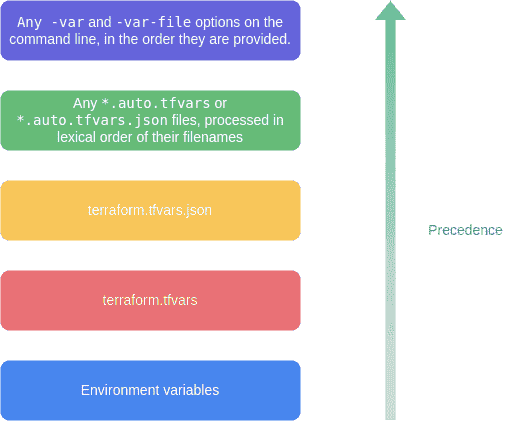
high priority variable overrides low priority one(high to low)
-varand-var-fileoptions on the command line, in the order they are provided.- .
*.auto.tfvarsor*.auto.tfvars.jsonfiles, processed in lexical order of their filenames. terraform.tfvars.jsonfileterraform.tfvarsfileEnvironmentvariables
Output Variables
    output "instance_ip_addr" {
     value = aws_instance.server.private_ip
    }
Meta-Argument
count
    resource "aws_instance" "server" {
        count = 4 # create four similar EC2 instances
        ami           = "ami-a1b2c3d4"
        instance_type = "t2.micro"
        tags = {
            Name = "Server ${count.index}"
    }}
for_each
- each.key — The map key
- each.value — The map value
for each
    module "bucket" {
        for_each = toset(["assets", "media"])
        source   = "./publish_bucket"
        name     = "${each.key}_bucket"
    }
Splat Expressions
If var.list is a list of objects that all have an attribute id, then a list of the ids could be produced with the following for expression:
[for o in var.list : o.id]
This is equivalent to the following splat expression:
var.list[*].id
lifecycle
Available for all resource blocks
create_before_destroyprevent_destroyignore_changesreplace_triggered_by.
lifecycle
    resource "azurerm_resource_group" "example" {
        lifecycle {
            create_before_destroy = true
        }}
depends_on
Handle hidden resource or module dependencies that Terraform cannot automatically infer.
    resource "aws_instance" "example" {

        # Terraform can infer from this that the instance profile must
        # be created before the EC2 instance.

        iam_instance_profile = aws_iam_instance_profile.example

        # However, if software running in this EC2 instance needs access  to the S3 API in order to boot properly, there is also a "hidden"
        # dependency on the aws_iam_role_policy that Terraform cannot
        # automatically infer, so it must be declared explicitly:

        depends_on = [
            aws_iam_role_policy.example
        ]
    }
dynamic Blocks
Use dynamic blocks when a nested block (like ingress rules) needs to repeat based on a variable:
variable "ingress_rules" {
  type = list(object({
    port     = number
    protocol = string
  }))
  default = [
    { port = 80,  protocol = "tcp" },
    { port = 443, protocol = "tcp" },
  ]
}

resource "aws_security_group" "web" {
  name = "web-sg"

  dynamic "ingress" {
    for_each = var.ingress_rules
    content {
      from_port   = ingress.value.port
      to_port     = ingress.value.port
      protocol    = ingress.value.protocol
      cidr_blocks = ["0.0.0.0/0"]
    }
  }
}
The iterator variable name (ingress above) defaults to the label of the dynamic block. Override with iterator = rule to use rule.value instead.
for Expressions
Transform one collection into another inline:
# List → list (filter and transform)
variable "instance_ids" {
  default = ["i-aaa", "i-bbb", "i-ccc"]
}

output "upper_ids" {
  value = [for id in var.instance_ids : upper(id)]
}
# → ["I-AAA", "I-BBB", "I-CCC"]

# Map → list
variable "users" {
  default = { alice = "admin", bob = "viewer" }
}

output "admin_users" {
  value = [for name, role in var.users : name if role == "admin"]
}
# → ["alice"]

# List → map
output "id_map" {
  value = { for idx, id in var.instance_ids : idx => id }
}
# → { 0 = "i-aaa", 1 = "i-bbb", 2 = "i-ccc" }
Essential Built-in Functions
String functions
format("Hello, %s!", var.name)         # → "Hello, Alice!"
templatefile("user_data.sh.tpl", {     # render a template file with variables
  hostname = var.hostname
})
lower("HELLO")                         # → "hello"
replace("hello world", "world", "TF") # → "hello TF"
split(",", "a,b,c")                    # → ["a", "b", "c"]
join("-", ["a", "b", "c"])             # → "a-b-c"
Collection functions
length(var.subnets)                    # count elements
merge(var.common_tags, var.env_tags)   # merge maps (right wins on conflict)
lookup(var.ami_map, var.region, "default-ami")  # map lookup with default
flatten([["a","b"], ["c"]])            # → ["a", "b", "c"]
distinct(["a", "b", "a", "c"])        # → ["a", "b", "c"]
toset(["a", "b", "a"])                # → set(["a", "b"])
keys(var.tags)                         # → list of map keys
values(var.tags)                       # → list of map values
Encoding functions
jsonencode({ key = "value" })          # → "{\"key\":\"value\"}"
jsondecode(file("config.json"))        # parse JSON string to HCL object
base64encode("hello")                  # → "aGVsbG8="
file("scripts/startup.sh")            # read file contents as string
filebase64("scripts/startup.sh")      # read file contents as base64
Numeric functions
max(10, 20, 5)    # → 20
min(10, 20, 5)    # → 5
ceil(4.1)         # → 5
floor(4.9)        # → 4
moved Block — Refactoring Without Destroy/Recreate
When you rename a resource or move it into a module, Terraform would normally destroy the old resource and create a new one. The moved block tells Terraform these are the same resource:
# You renamed aws_instance.web to aws_instance.web_server
moved {
  from = aws_instance.web
  to   = aws_instance.web_server
}

# You moved a resource into a module
moved {
  from = aws_instance.web
  to   = module.compute.aws_instance.web
}
terraform plan shows "moved" actions (not destroy/create). terraform apply updates the state reference without touching the real resource. Remove the moved block once all team members have applied.
Related Posts
- IaC Concepts & TF Overview — the declarative model and variable precedence rules that underpin everything in this post
- TF Modules: How to Use & Create — modules use input variables defined here; outputs connect module resources
- TF State & Backend Management — state tracks the real resource IDs that result from the resources and data sources configured here
