
Building a Live GTC 2026 Agenda Tracker (and Syncing It to Google Calendar)
I just wanted a normal agenda for GTC Berlin 2026 that I could search and drop into Google Calendar. NVIDIA's attendee portal is login-gated, so I found the public API behind their marketing page instead, built a live searchable agenda, generated an .ics calendar, and wrote a script that auto-colors 148 Google Calendar events by session type. A few things broke along the way, and I wrote those down too.
Building a Live GTC 2026 Agenda Tracker (and Syncing It to Google Calendar)
I'm going to GTC Berlin in October, and all I wanted going in was a normal agenda page — something I could search
and actually plan a day around. Turned out that's harder to get than it should be. NVIDIA's official session
catalog sits behind register.nvidia.com, and that whole flow won't show you a single session unless you're logged
into your registration account. Fine if you're sitting at a desk. Less fine when you're trying to check "what's on
at 3, and which room" from your phone between sessions.
So I built my own instead. This post is the whole chain: finding where the data actually lives, a script that exports it to a calendar file, a page to browse it live, a bit of Google Calendar automation, and a couple of things that broke along the way.
The problem: too much page, not enough view
Even NVIDIA's public catalog — the one that doesn't need a login — isn't great to actually use. It loads 114 of the 144 sessions and hides the rest behind a Load More button. You click it, the whole layout reflows, you scroll back down to find where you were, and do it again. On a phone that's a lot of swiping just to answer something like "what's on Wednesday afternoon," and you lose track of sessions you already scrolled past. There's never one view of the whole thing — you end up feeling a bit lost in it, honestly.
I had the network tab open while clicking through it, mostly out of curiosity, and found something kind of funny: the very first request the page makes already has all 144 sessions in it.
GET .../api/v1/search?eventid=1777934151352gtceu26&view=data&page=0&size=1000
→ { "totalResults": 144, "totalPages": 1, "data": [ /* all 144 */ ] }
So the pagination isn't a backend thing at all, it's just a UI decision. The full list is already sitting in the browser's memory after that first load — clicking Load More is only un-hiding rows that were already downloaded. Once I saw that, the fix was obvious: don't paginate, just render everything.
That's really the whole idea behind the page I ended up building: one table with all 148 session slots in it, a search box and two dropdown filters instead of scrolling, and a single button that adds the entire agenda to your calendar instead of clicking "add to calendar" 148 separate times.
Finding the data NVIDIA doesn't gate
The linked-to catalog page calls register.nvidia.com/flow/loadPage?..., and hitting that directly (no login
session) returns exactly this:
{"data":{"responseCode":"0","responseMessage":"Success","unauthorized":true}}
No error, just a flag telling you to go away. So yeah, the attendee portal really is gated.
But NVIDIA also runs a plain public marketing page for the event at nvidia.com/en-eu/gtc/session-catalog/, and
that one has no login wall at all — anyone can browse every session as a random visitor. I opened dev tools, watched
its network traffic while it loaded, and found where it was actually pulling data from:
GET https://api-prod.nvidia.com/services/sessioncatalog/api/v1/search
    ?eventid=1777934151352gtceu26&view=data&page=0&size=1000
A plain REST endpoint, Access-Control-Allow-Origin: *, no auth headers, no cookies — genuinely public. One request
returns all 148 sessions: title, abstract, speakers, room, and both a top-level start/end time and a times[] array
for sessions with multiple occurrences (full-day workshops mostly). That single endpoint is the foundation for
everything below.
Calendar export: a .ics generator
First stop was a Node script that fetches the catalog and writes a standards-compliant iCalendar file — the kind Google Calendar's Import feature accepts directly. The fiddly part isn't the HTTP call, it's getting RFC 5545 right: CRLF line endings, folding any line over 75 octets onto a continuation line, and escaping commas/semicolons inside field values.
// RFC 5545 requires CRLF line endings and folding any line over 75 octets
// onto a continuation line starting with a single space.
const foldLine = (line) => {
    const bytes = Buffer.from(line, "utf8");
    if (bytes.length <= 75) return line;
    const parts = [];
    let start = 0, limit = 75;
    while (start < bytes.length) {
        let end = Math.min(start + limit, bytes.length);
        while (end < bytes.length && (bytes[end] & 0xc0) === 0x80) end--; // don't split a UTF-8 char
        parts.push(bytes.subarray(start, end).toString("utf8"));
        start = end;
        limit = 74; // continuation lines lose one column to the leading space
    }
    return parts.join("\r\n ");
};
Sessions with multiple time slots get one VEVENT per occurrence, each with its own UID built from the session
ID plus the slot ID — stable and unique, which matters later.
The "0 out of 0 events" debugging detour
The first real import attempt into Google Calendar failed outright: "Imported 0 out of 0 events. Unable to process your iCal/CSV file." Not a partial failure — a flat rejection.
Before touching anything, I validated the file against a real, spec-compliant parser rather than guessing:
from icalendar import Calendar
cal = Calendar.from_ical(open("gtc-eu-2026-agenda.ics", "rb").read())
print(len([c for c in cal.walk() if c.name == "VEVENT"]))  # 148
It parsed cleanly — 148 valid events, correct CRLF, no BOM. The file was fine; Google's importer was just being Google's importer for a minute. Re-uploading the exact same, unmodified file worked the second time. If you ever hit this yourself, check the file with a real parser before you start rewriting anything — Google's error message gives you no way to tell "your file is broken" from "the importer had a bad moment" apart.
A live agenda page, not a static export
A .ics file is great for a calendar app, useless for "what's happening right now" browsing. So the second piece is
a single self-contained HTML page that fetches the same public endpoint client-side and renders a sortable,
filterable table — no backend, no build step:
→ Try the live GTC 2026 agenda
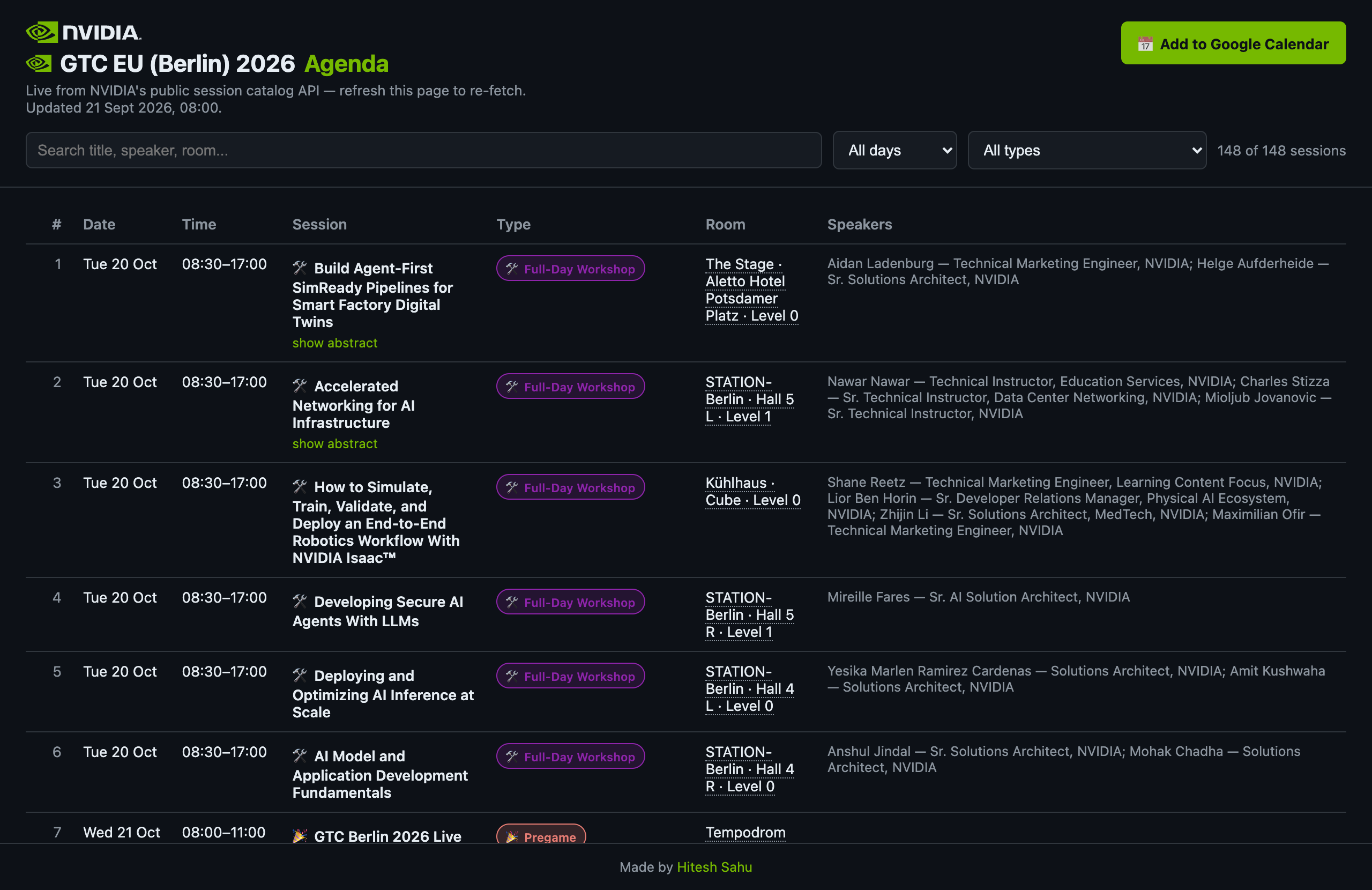
- Search across title, speaker, room, and theme
- Sort by clicking any column header
- Filter by day or session type
- Each session type gets its own emoji + color badge (mirrored from Google Calendar's own 11-color event palette, so the two views feel like one system)
- Room names link out to a Google Maps search for that venue
const mapsUrl = (room) =>
    `https://www.google.com/maps/search/?api=1&query=${encodeURIComponent(`${room}, Berlin, Germany`)}`;
Live and past, at a glance
Once the page was useful, the next question was obvious: which of these 148 rows is happening right now? Each row compares its start/end against the current time and gets one of three states — upcoming (default), live (a subtle green left-border glow plus a small pulsing dot), or past (dimmed to 40% opacity):
tbody tr.live { background: color-mix(in srgb, #33b679 10%, transparent); box-shadow: inset 3px 0 0 #33b679; }
.live-dot {
    display: inline-block; width: 7px; height: 7px; border-radius: 50%;
    background: #33b679; animation: live-pulse 1.8s infinite;
}
The whole table re-renders every 60 seconds (no re-fetch — just recomputing state against Date.now()), so rows
transition from upcoming → live → past on their own if you leave the tab open during the event.
Making it survive a flaky API
NVIDIA's endpoint being public doesn't mean it's always fast. So loading follows a stale-while-revalidate pattern:
anything already in localStorage renders instantly, then a background fetch — capped at an 8-second timeout via
AbortController — replaces it only if fresh data actually arrives. If the live request fails or times out, the
cached view just stays up with a small "showing cached data from <time>" note instead of an error screen.
I tested this by killing the network request to NVIDIA mid-flight and checking that the page still rendered all 148 rows from cache, correctly labeled as stale. Worth doing — this is exactly the kind of thing you wouldn't notice until the one time the API actually goes down on you.
Syncing the colors into Google Calendar
The web page is nice for browsing, but I still wanted the actual Google Calendar events — the ones I'd already imported and would be looking at on my phone — visually color-coded by session type, not one flat color.
Google's .ics importer doesn't support per-event colors from the file itself; that only works through the Calendar
API. So this became a small OAuth-authenticated Node script:
- List events in my "Nvidia GTC 2026" calendar
- Match each one back to the source data by its
iCalUID— the exact same UID the.icsgenerator assigned, so there's zero ambiguity about which calendar event maps to which session PATCHcolorId(and, later, the title — prefixing an emoji and folding the room into it, since Month view doesn't show location) for whatever's out of date, skipping anything already correct
const patch = {};
if (info.colorId && event.colorId !== info.colorId) patch.colorId = info.colorId;
if (event.summary !== info.summary) patch.summary = info.summary;
if (info.room && event.location !== info.room) patch.location = info.room;
if (Object.keys(patch).length) await calendar.events.patch({ calendarId, eventId: event.id, requestBody: patch });
Rebuilding the desired title from source data on every run — rather than trying to patch the existing string — is what makes this safe to re-run: no risk of stacking emoji or duplicating text on a second pass.
Two OAuth gotchas
The Google Cloud OAuth consent screen wants a "test user" explicitly added while the app is unverified — miss that step and you get a generic "hasn't completed the Google verification process" wall with no obvious next action.
More interesting: @google-cloud/local-auth's usual flow tries to auto-launch your system browser via the open
package. In a sandboxed shell that call just does nothing, silently — no error, no browser, just a hang. The fix was
dropping down to a manual loopback server with google-auth-library's OAuth2Client directly and printing the
auth URL instead of trying to open it:
server.listen(0, "127.0.0.1", () => {
    const redirectUri = `http://localhost:${server.address().port}`;
    oAuth2Client = new OAuth2Client(key.client_id, key.client_secret, redirectUri);
    console.log(oAuth2Client.generateAuthUrl({ access_type: "offline", scope: SCOPES }));
});
That surfaced a second bug: browsers love firing a second request — a stray favicon.ico fetch — on the same
connection right after the real OAuth callback. That request arrived after the server had already called
.close(), and server.address() returned null, crashing the handler with a TypeError that looked for all the
world like the OAuth exchange itself had failed. The actual fix was a settled flag, set synchronously the moment
the real authorization code is found — before the await on token exchange — so anything arriving afterward gets a
no-op 204 instead of being treated as a second callback:
const server = http.createServer(async (req, res) => {
    if (settled) { res.writeHead(204).end(); return; }
    // ...
    settled = true; // before the await, not after
    const { tokens } = await oAuth2Client.getToken(code);
});
Hardening: obfuscation and SEO
Once the page was actually good, two more things mattered: I didn't want the source trivially readable via View Source (there's no secret to protect — the API is public — but there's no reason to make copy-paste effortless either), and I wanted it to actually rank for "GTC 2026 agenda" searches.
For the first, a small build step runs the inline <script> through javascript-obfuscator (control-flow
flattening, string-array encoding, hex identifier names) and writes the result to public/. The readable source
never gets hand-edited again — it's the input to a build, not the deployed artifact.
For SEO, the page got real <title>/<meta description> copy built around the actual search phrase, Open Graph and
Twitter Card tags matched to this site's existing conventions, and — the part that actually matters for
agenda/schedule-type queries — JSON-LD Event structured data:
{
  "@context": "https://schema.org",
  "@type": "Event",
  "name": "GTC Berlin 2026 (GTC EU)",
  "startDate": "2026-10-20",
  "endDate": "2026-10-22",
  "location": { "@type": "Place", "name": "STATION-Berlin", "address": { "addressLocality": "Berlin", "addressCountry": "DE" } },
  "organizer": { "@type": "Organization", "name": "NVIDIA" }
}
That's what makes a page eligible for Google's event rich results — a date/venue chip directly in search, not just a blue link.
Where it landed
So, four things came out of this:
- The live agenda page — hiteshsahu.com/GTC-EU-Berlin-2026 — search, sort, filter, live/past states, and it still works if NVIDIA's API is slow or down
- The
.icsgenerator, a proper RFC 5545 file I can re-run any time NVIDIA updates the schedule - The Google Calendar colorizer, safe to re-run whenever, that keeps 148 real calendar events in sync by type
- An SEO pass and a small obfuscation build step, since it's a static file living on this site now and I wanted it both findable and not trivially copy-pasteable
Funny how that goes — one login wall being mildly annoying turned into a week of RFC 5545 line-folding, OAuth loopback redirects, cache invalidation, and JSON-LD. But I've got an agenda now that I'll actually use in October.
