Terraform
Terraform Core Workflow & Commands
Learn how to plan, apply, and manage your Terraform infrastructure efficiently.
Terraform
Cloud
Infrastructure as Code
IaC
DevOps
Terraform Core Workflow & Commands
Use Terraform outside the core workflow - 14%
- 4a Describe when to use
terraform importto import existing infrastructure into your Terraform state - 4b Use
terraform stateto view Terraform state - 4c Describe when to enable verbose logging and what the outcome/value is
Core Terraform workflow - 14%
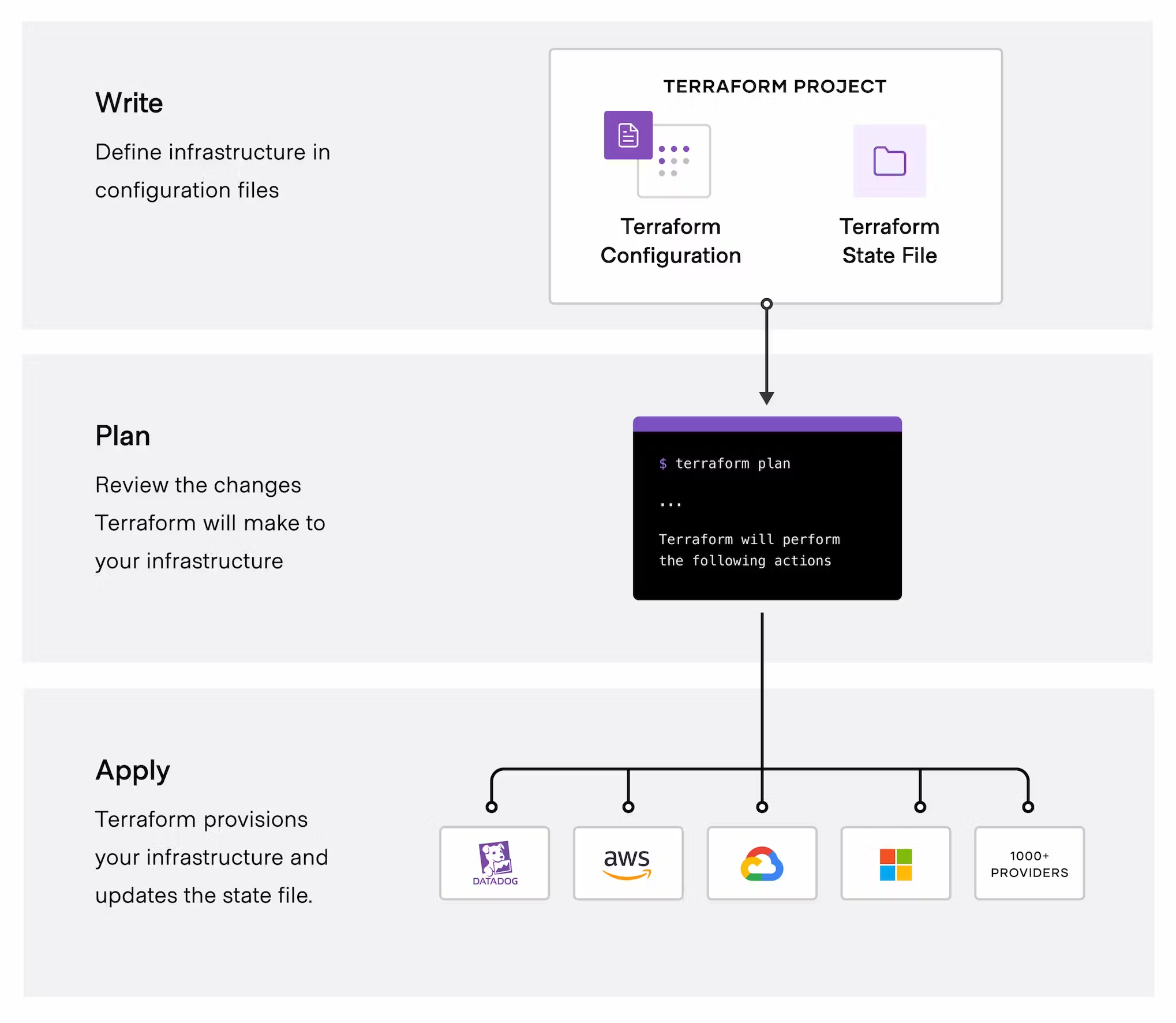
- 6a Describe Terraform workflow ( Write -> Plan -> Create )
- 6b Initialize a Terraform working directory (
terraform init) - 6c Validate a Terraform configuration (
terraform validate) - 6d Generate and review an execution plan for Terraform (
terraform plan) - 6e Execute changes to infrastructure with Terraform (
terraform apply) - 6f Destroy Terraform managed infrastructure (
terraform destroy) - 6g Apply formatting and style adjustments to a configuration (
terraform fmt)
Initialize your Terraform working directory
| command | use |
|---|---|
terraform init |
initialize directory, pull down providers |
terraform init -get-plugins=false |
initialize directory, do not download plugins |
terraform init -verify-plugins=false |
initialize directory, do not verify plugins for Hashicorp signature |
Format and Validate Terraform code
| command | use |
|---|---|
terraform fmt |
format code per HCL canonical standard |
terraform fmt -diff |
display diffs of formatting changes |
terraform fmt -check -recursive |
process files in subdirectories |
terraform validate |
validate code for syntax |
terraform validate -json |
produce validation results in JSON format to allow using the validation result for tool integrations, |
terraform validate -backend=false |
validate code skip backend validation |
Plan, Deploy and Cleanup Infrastructure
| command | use |
|---|---|
terraform plan -out plan.out |
output the deployment plan to plan.out |
terraform apply plan.out |
use the plan.out plan file to deploy infrastructure |
terraform apply --auto-approve |
apply changes without being prompted to enter "yes" |
terraform plan -destroy |
outputs a destroy plan |
terraform destroy --auto-approve |
destroy/cleanup deployment without being prompted for “yes” |
terraform apply -target=aws_instance.my_ec2 |
only apply/deploy changes to the targeted resource |
terraform apply -var my_region_variable=us-east-1 |
pass a variable via command-line while applying a configuration |
terraform apply -lock=true |
lock the state file so it can't be modified by any other Terraform apply or modification action(possible only where backend allows locking) |
terraform force-unlock LOCK_ID |
unlock state file |
terraform apply -refresh=false |
do not reconcile state file with real-world resources(helpful with large complex deployments for saving deployment time) |
terraform apply --parallelism=5 |
number of simultaneous resource operations (Default 10) |
terraform refresh |
reconcile the state in Terraform state file with real-world resources |
terraform providers |
get information about providers used in current configuration |
Terraform Import And Outputs
| command | use |
|---|---|
terraform import aws_instance.new_ec2_instance i-abcd1234 |
import EC2 instance with id i-abcd1234 into the Terraform resource named "new_ec2_instance" of type "aws_instance" |
terraform import 'aws_instance.new_ec2_instance[0]' i-abcd1234 |
same as above, imports a real-world resource into an instance of Terraform resource |
terraform output |
list all outputs as stated in code |
terraform output instance_public_ip |
list out a specific declared output |
terraform output -json |
list all outputs in JSON format |
Terraform workflow
TF workflow is 3 Steps
- Write: write IaC
- Plan: Preview changes before applying
- Apply: Provision Infrastructure