No personal data is stored on our servers however third party tools Google Analytics cookies to measure traffic and improve your website experience. Learn more
You can retrieve the IAM role name attached to your EC2 instance using the Instance Metadata service, but you can not
retrieve the IAM policies themselves.
SECURITY GROUP
Stateful
Firewall around EC2 Instance
Many to Many: Security group can be attached to multiple EC2 instance. EC2 can have multiple Security group
Locked to region/ VPC
By Default Block all Inbound requests and Allow all Outbound traffic
Security rules must modify to allow specific type of traffic eg HTTPS
Regulate:
Port Access
Authorize IP Range(IPV4, IPV6)
Protocol
PORT
Protocol
Usage
22
SSH(Secure Shell)
Log into Linux Instance
22
SFTP(Secure File Transfer Protocol)
Upload File using SSH
21
FTP(File Transfer Protocol)
Upload file into file share
80
HTTP
Unsecure Site
443
HTTPS
Secure Site
3389
RDP(Remote Desktop Protocol)
Log Into Window Instance
Shutdown Behavior
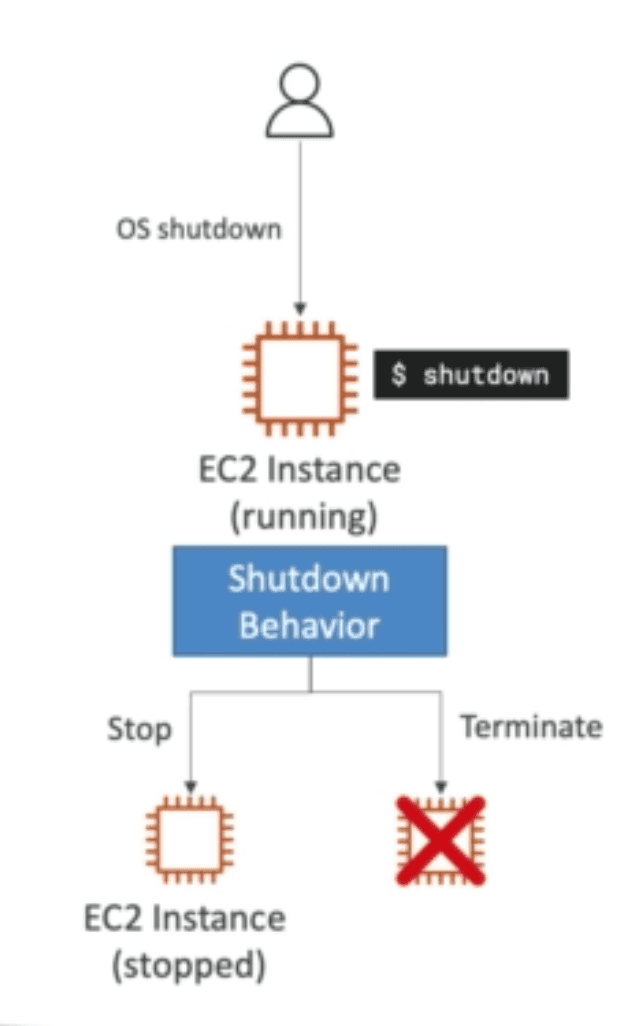
Shutdown by OS using $shutdown command can result into:
Stop (Default)
Terminate
State is defined by CLI attribute: InstanceInitiatedShutdownBehaviour
Termination Protection
Protect against accidental termination in AWS console or CLI
If ShutdownBehaviour = Terminate and OS shutdown from OS -> EC2 will terminate because its from OS
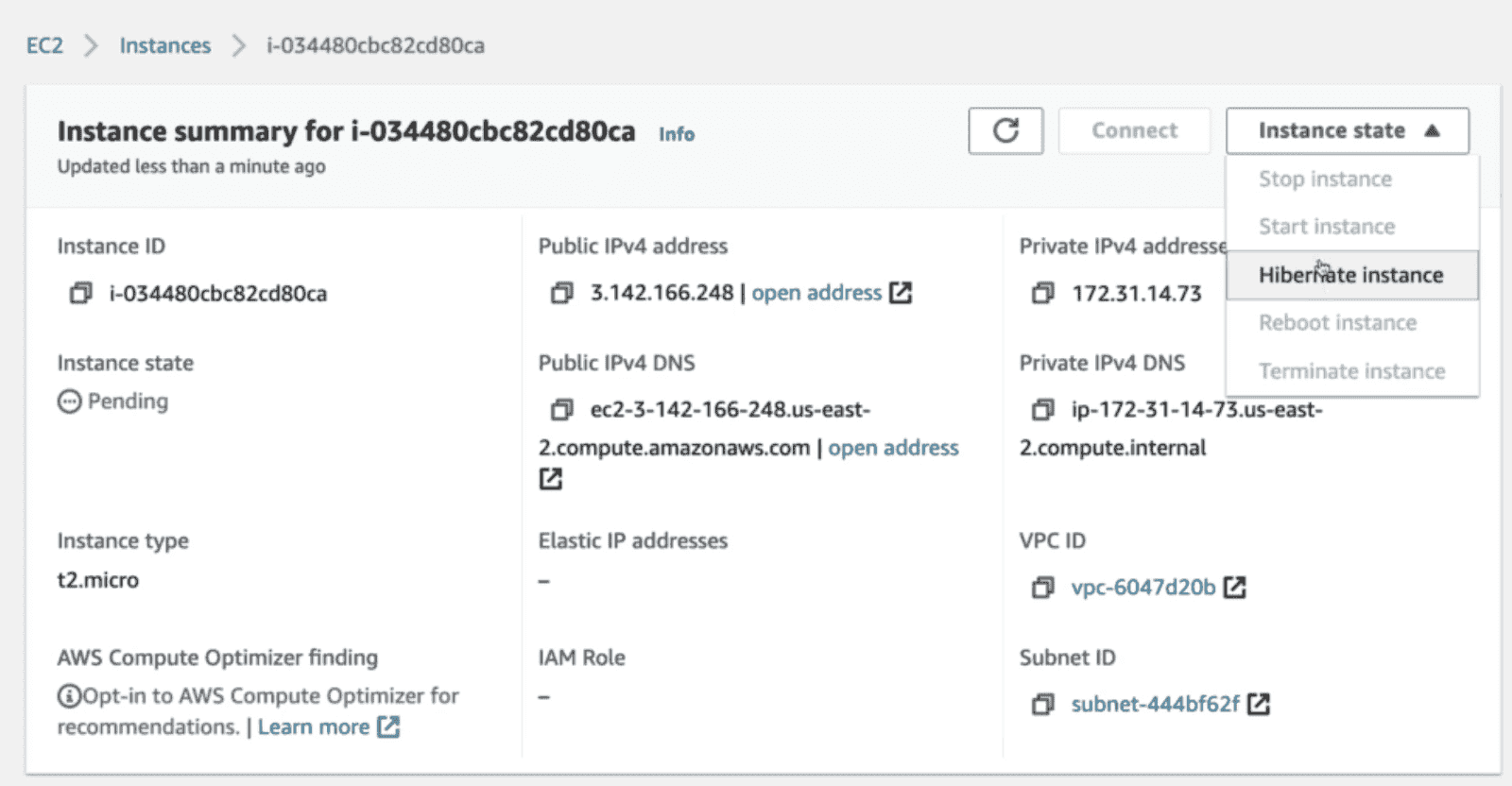
EC2 Hibernate
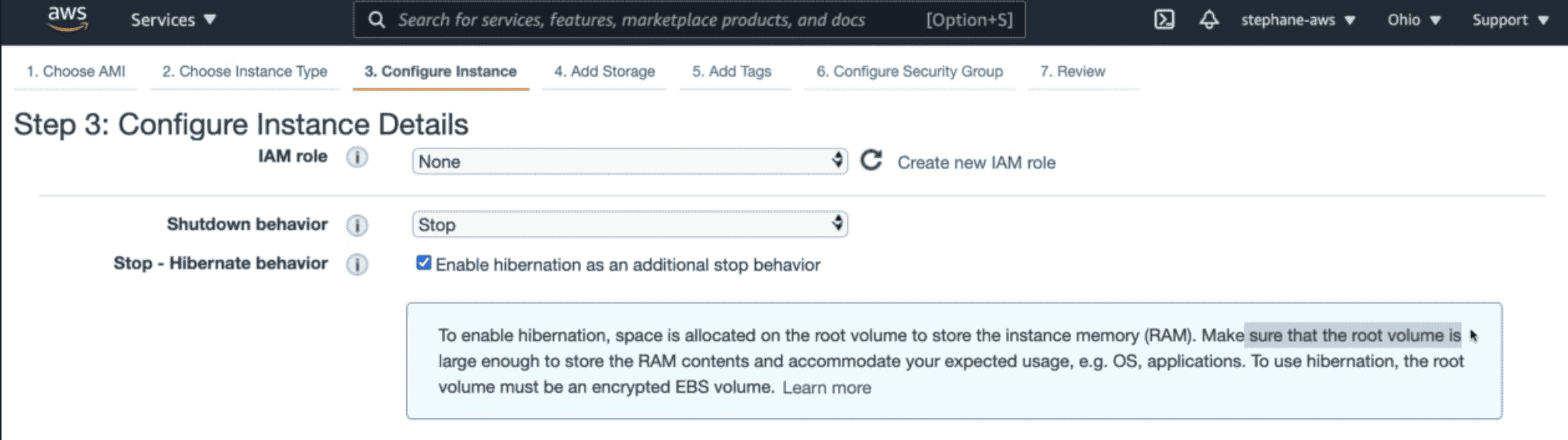
Store RAM of EC2 to root EBS storage for fast boot of EC2
EC2 does not terminate
Limitation:
Root EBS Volume must be Encrypted
RAM size must be less than 150 GB
Available for on Demand & Reserved Instance
Time limited to 60 Days
Pricing Model
One-minute minimum charge for Linux based EC2 instances
1. On Demand:
Pay as you go, no upfront payment
2. Saving Plan:
Consistent Usage cost per year for long time
EC2 : 72% discount
Compute Saving plan: uses machine learning to recommend optimal AWS resources and therefore reduces costs.
66% Saving Plan
3. Reserved Instances:
75 % Billing discount to on demand instance.
1-3 Year commitment & give big discount.
Reservation Period: 1Year= +discount | 3 year +++ discount
Purchase option: no upfront | partial upfront = +discount | All upfront ++discount
need instance withing a time window over along interval
4. Spot Instances:
Make available computation power for temporary on demand usage
2 minute warning
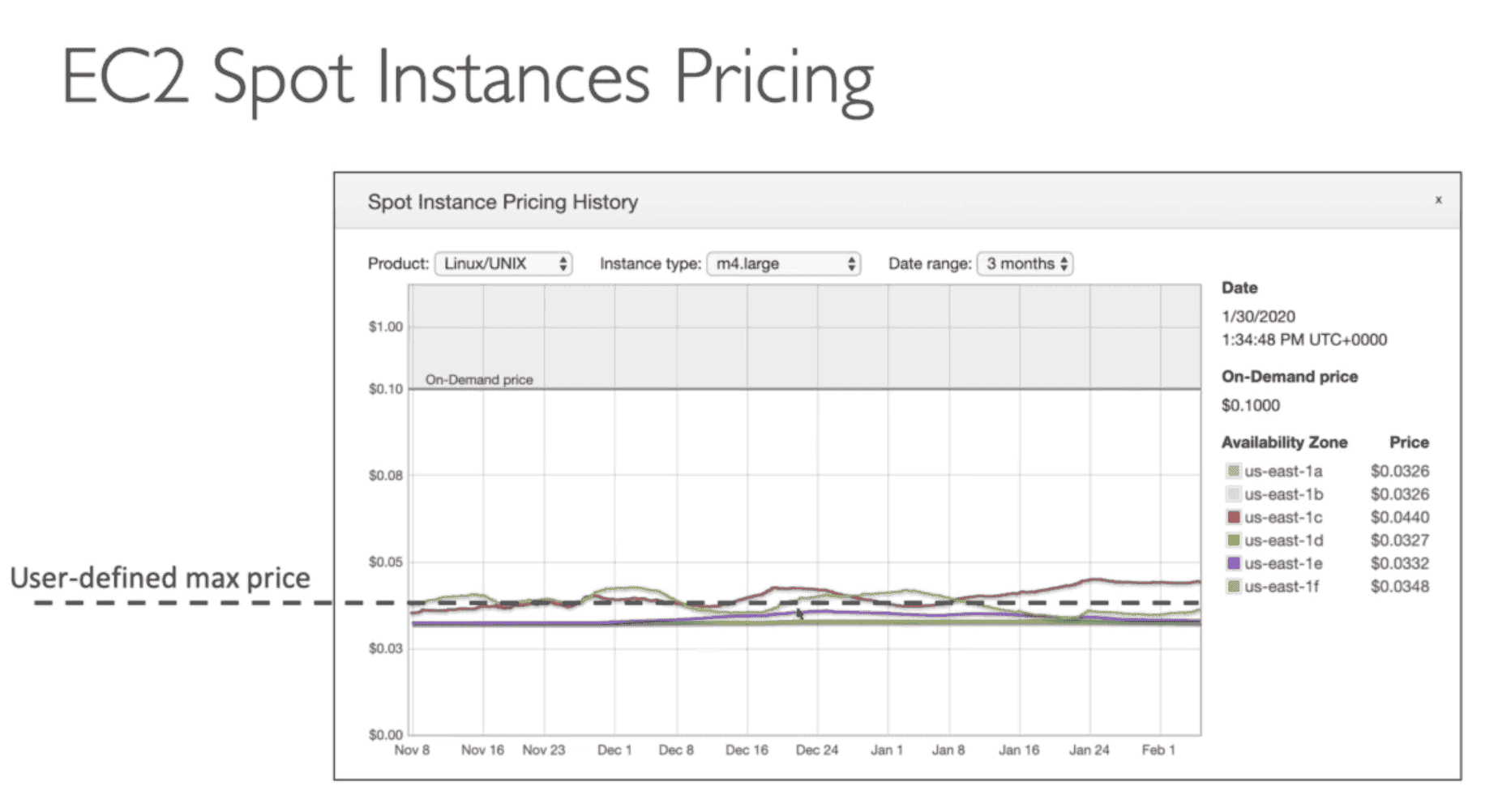
Up to 90% discount
Spot price changes over time
Use case image processing, Batch job, distributed workload
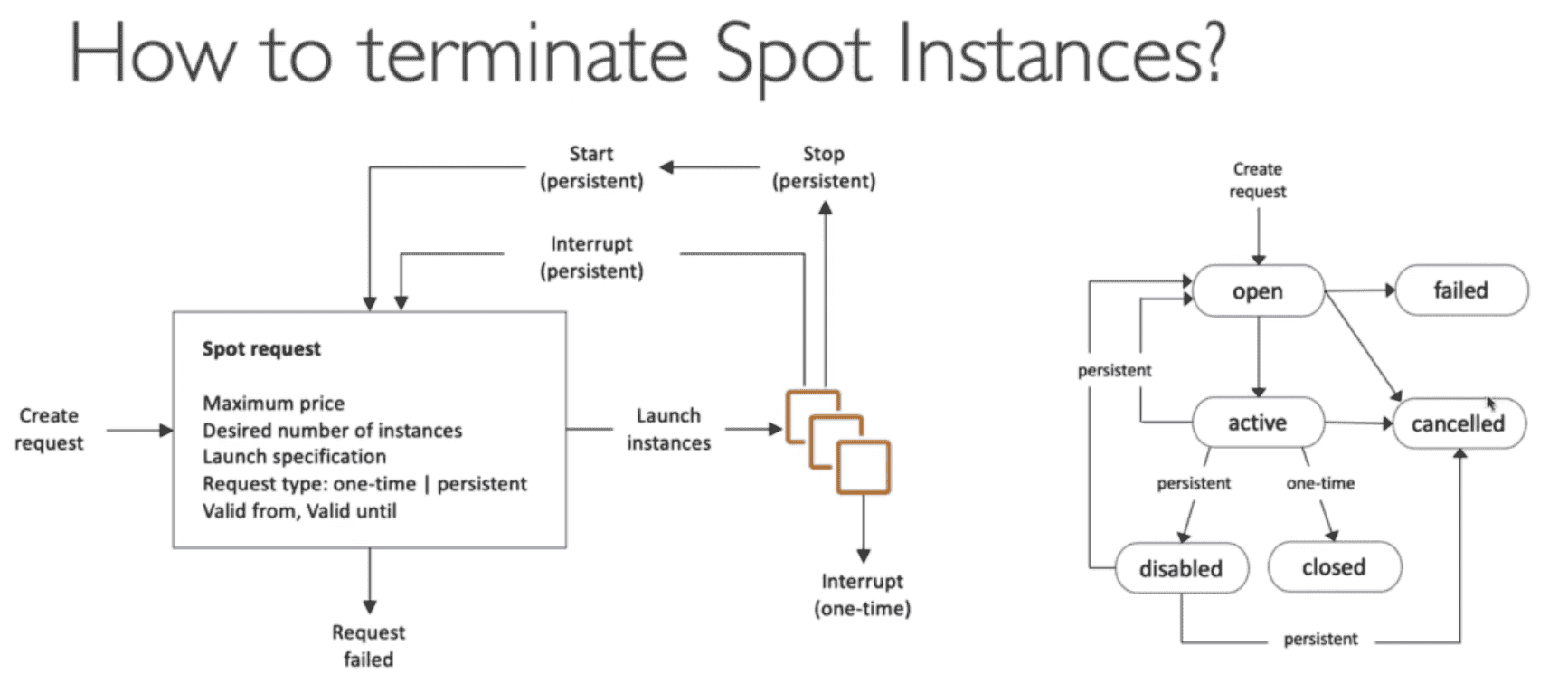
Cancel all spot request and then terminate spot instance because request will launch spot instance
5. Spot Fleet:
Set of Spot Instance + On Demand Instance (Optional)
Spot fleet will try to meet target capacity within price constrain by launching spot instance based on
Lowest price: short workload
Diversify: distributed across pool for high Availability & long workload
Capacity Optimized: Optimal Capacity for number of instance
6. Dedicated Host:
For compliance requirement for software license
allow per core or per cpu renting of physical server
Can be reserved for 3 year
More expensive
Give access to underlying hardware
7. Dedicated Instances
Dedicated EC2 instance
Soft version of Dedicated hosts
Per instance billing
Don't get access to underlying hardware
EC2 Troubleshooting
InstanceLimitExceeded: reached max onDemand CPU /Region Limit = 64 vCPU by default for onDemand & Spot Instances
Launch EC2 in different region of request to increase limit
Can be seen in Limit in EC2 or Service Quota
InsufficientInstanceCapacity : AWS don't have enough on demand capacity in AVZ
Wait for capacity to increase or make request smaller or change instance type
Launch EC2 in different EC2
EC2 terminate immediately from Pending state:
Root EBS is corrupt
Don't have permission to decrypt root EBS
Reached EBS Volume limit
EBS Snapshot corrupt
EC2 Instance Status Checks
1. SYSTEM status checks
monitor the AWS systems on which your instance runs
Monitor Problem with the underlying host:
Loss of network connectivity
Loss of system power
Software issues on the physical host
Hardware issues on the physical host that impact network reachability
Either wait for AWS to fix the host, OR
Troubleshoot
Move the EC2 instance to a new host = STOP & START the instance (if EBS backed)
2. INSTANCE status checks
monitor the software and network configuration of your individual instance
Monitor problem in EC2:
Incorrect networking or startup configuration
Exhausted memory
Corrupted file system
Incompatible kernel
Requires your involvement to fix
Troubleshoot
Restart the EC2 instance, OR
Change the EC2 instance configuration
ELASTIC LOAD BALANCER(ELB) Service
Load Balancer
Severs that direct traffic to different Servers(EC2) based on work load
Work on Region level in multiple AVZ
Managed & upgraded by AWS.
Works With:
EC2, ASG, ECS,
ACM(Certificate manger), Cloud Watch,
Route53, WAF, Global Accelerator
USAGE:
Expose Static DNS as single point of access to App
Each EC2 instance have own public IP. With Load Balancer we can use static DNS name to access EC2 instances.
Hide private traffic from Public Internet
Hide EC2 Instance from Internet
Both the EC2 instances and the ALB are deployed on a VPC with the following CIDR 192.168.0.0/18.
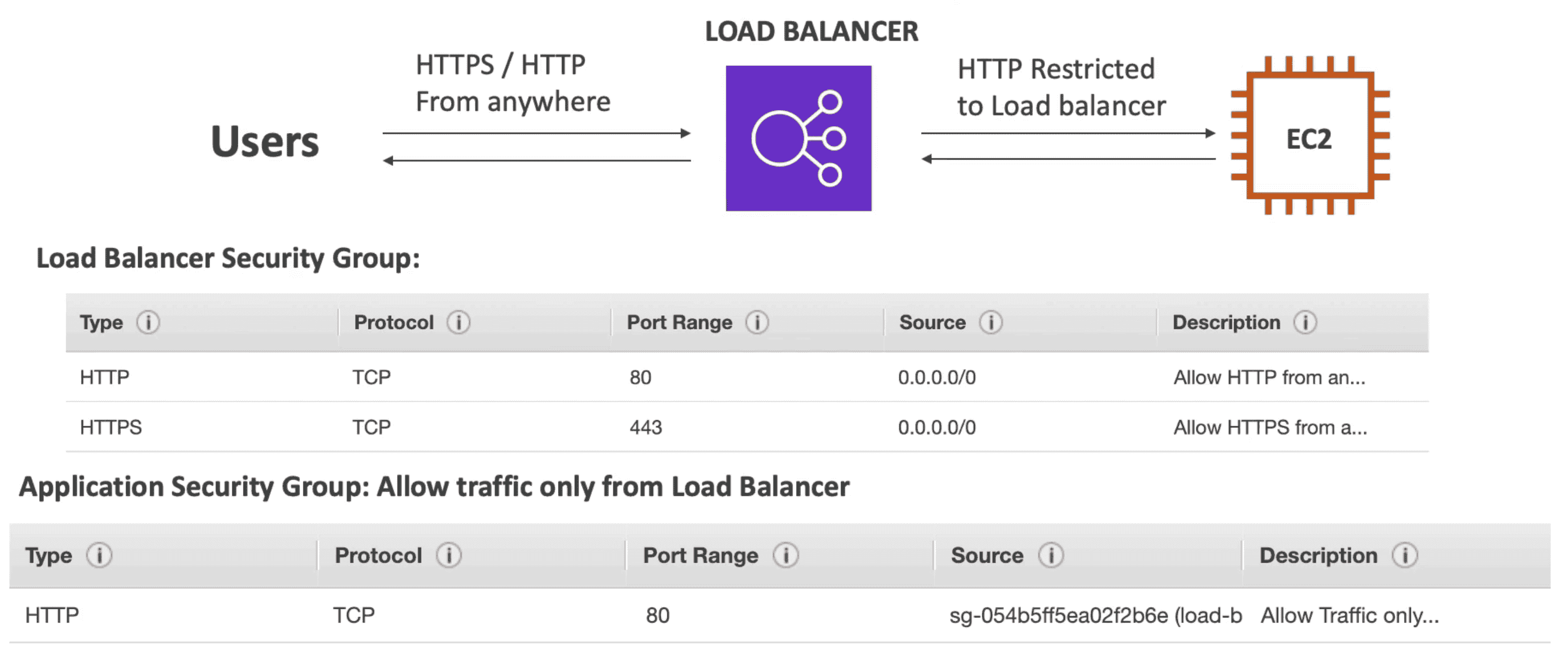
Security Group of ELB allow inbound traffic from anywhere 0.0.0.0/0 for HTTP & HTTPS request
EC2 only allow traffic from ELB
Configure the EC2 instances' to allow inbound traffic from security group of ALB at port 80.
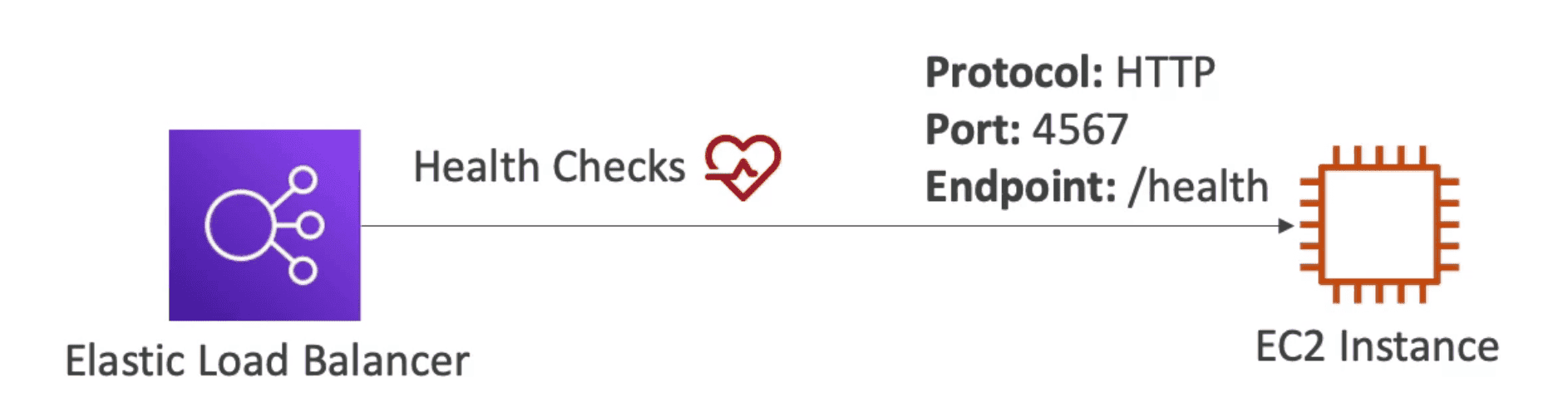
Perform Health check on EC2 Instances
Switch EC2 Instances dynamically based on load and health of EC2 instance
Provide HTTPS end point
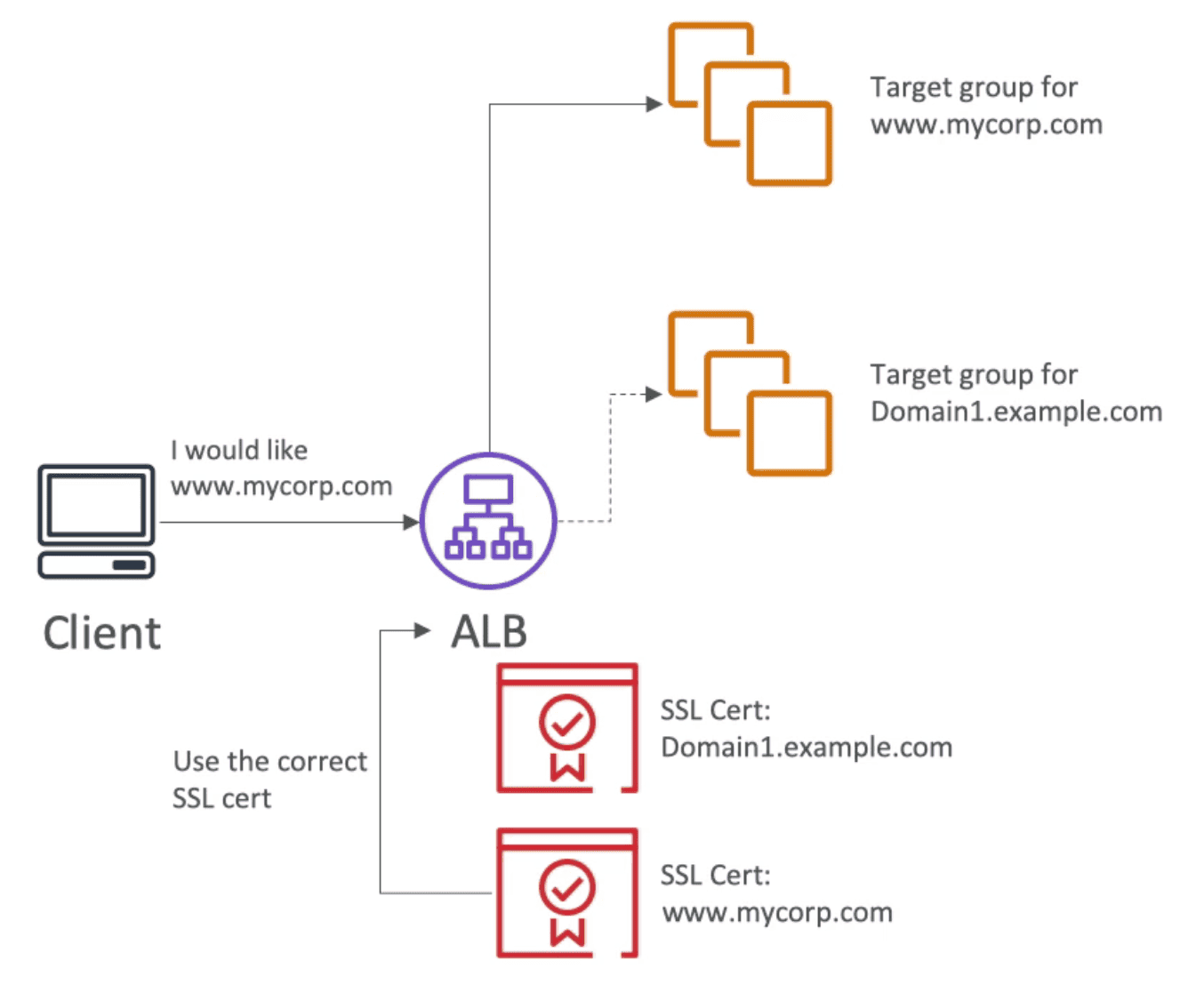
ACM (AWS Certificate Manger) & SNI(Server Name Indication)
SNI (Server Name Indication)
List of certificate to supported by list of host name to create SSL connection to ELB
Load multiple Certificate to one web server
Works with ALB, NLB to support multiple Certificate for Multiple Listeners
Supports Cloudfront
Does not support CLB
Cross Zone Load Balancing
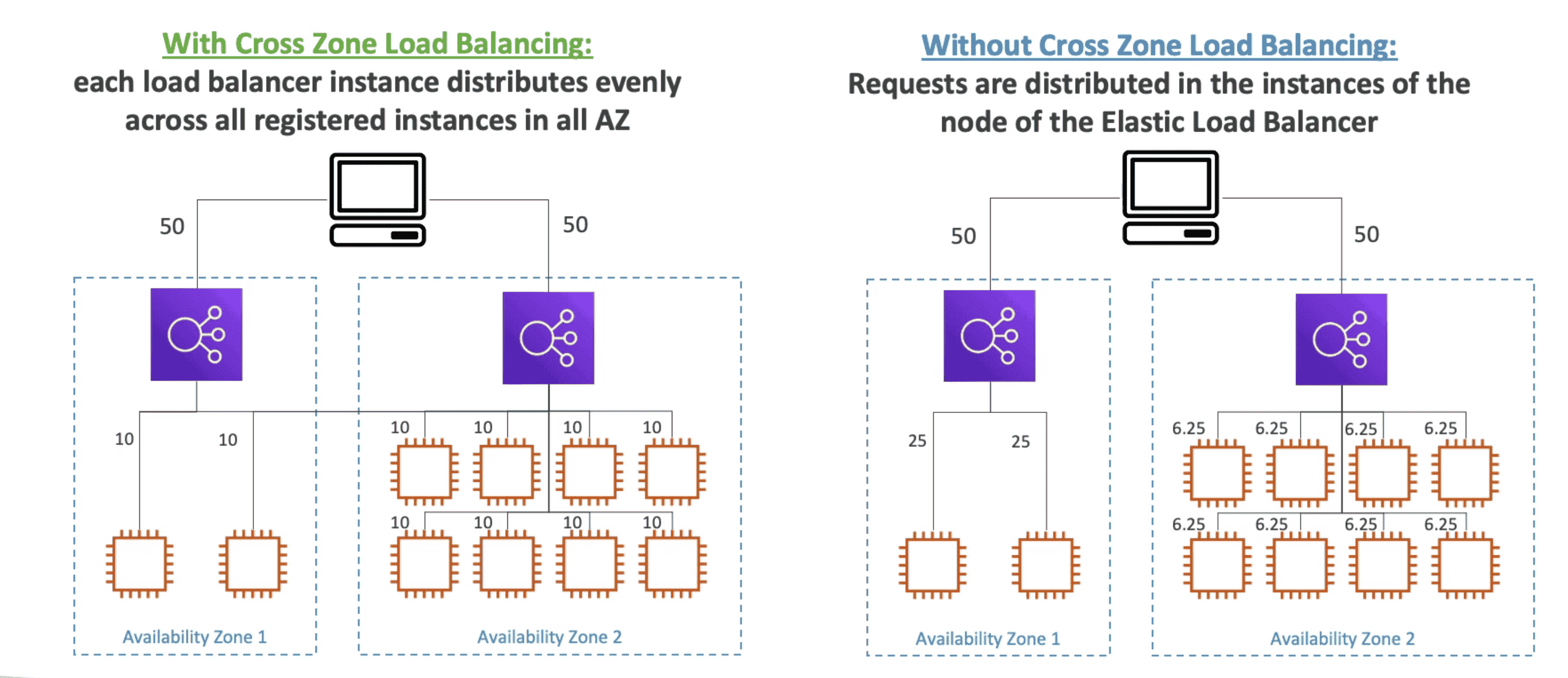
Balance load equally across all instances across all AVZ
When Cross-Zone Load Balancing is enabled, ELB distributes traffic evenly across all registered EC2 instances in all
AZs.
Health Check 🩺
When you enable ELB Health Checks, ELB won't send traffic to unhealthy (crashed) EC2 instances.
ALB perform Health Checks on a port & route(/health: commonly used)
If response is 200 Instance is okay
If response not 200, it is marked unhealthy and will be terminated while the ASG launches a new EC2 instance
Elastic Load Balancer types:
CLB
ALB
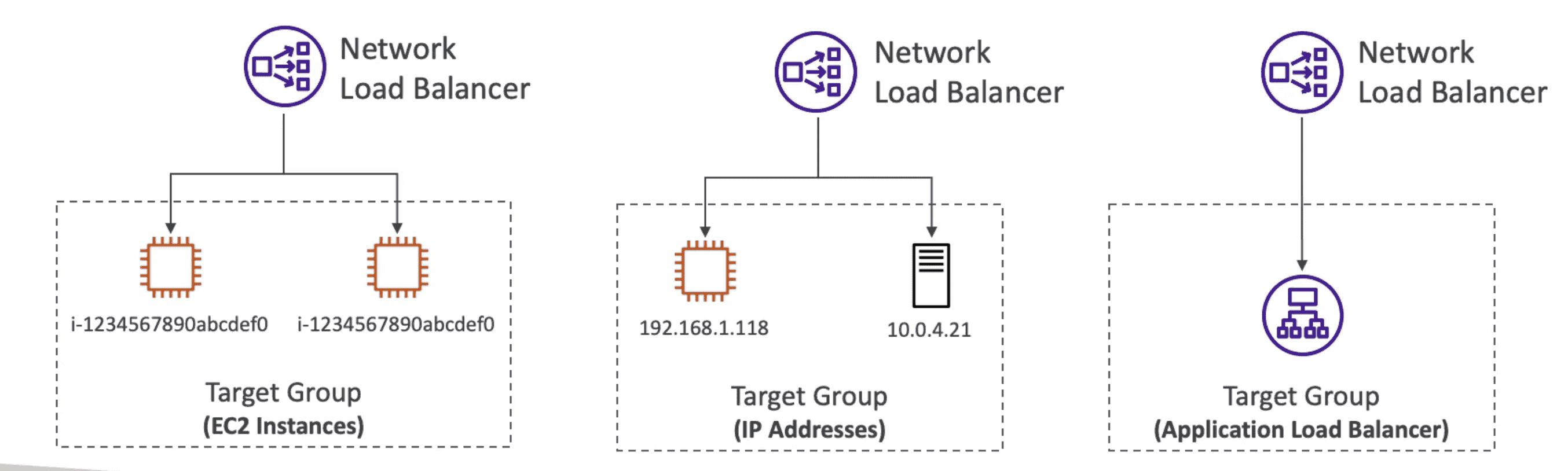
NLB
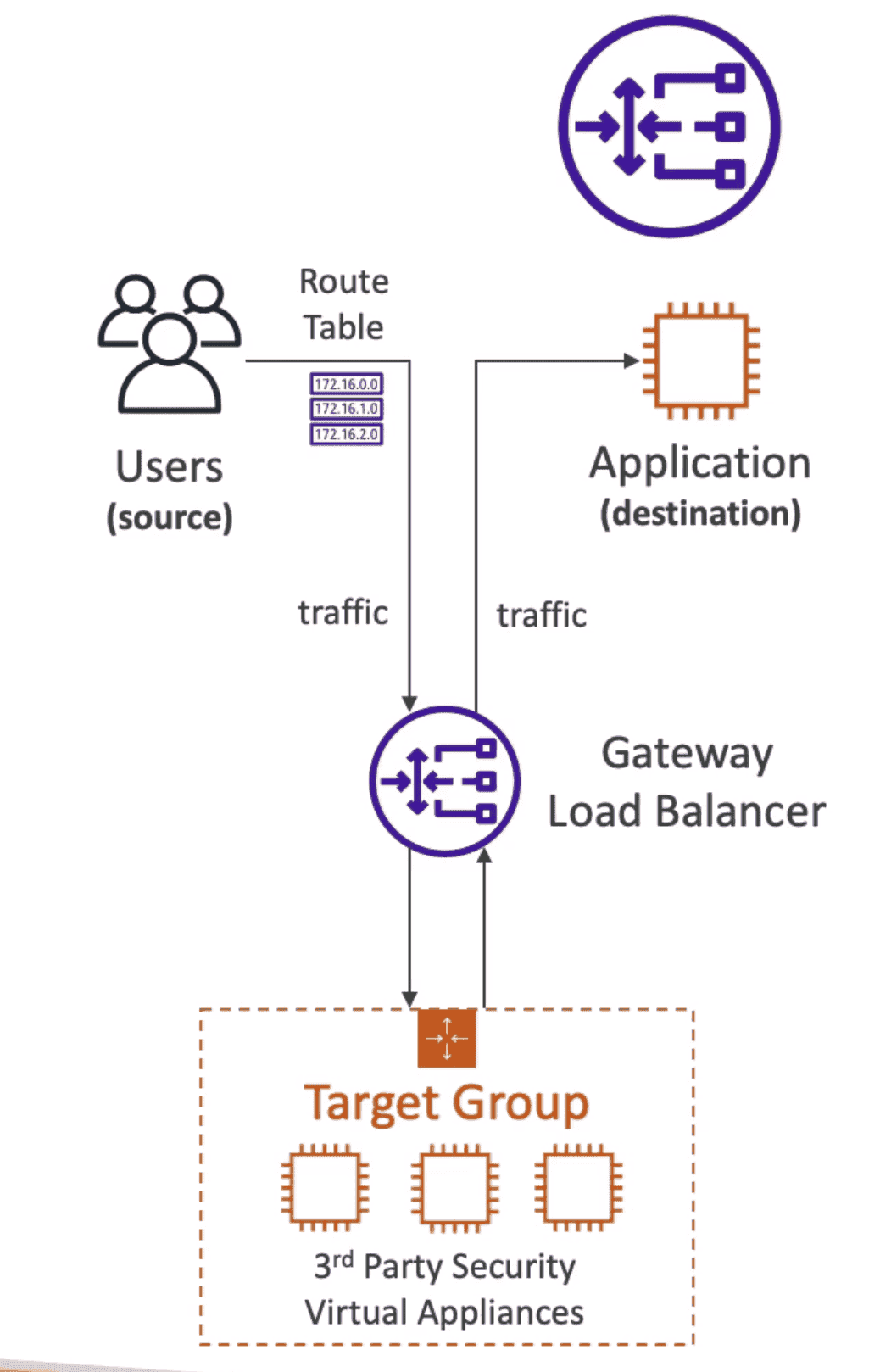
GLB
Version
V1(Legacy deprecated))
V2
V2
Protocol
TCP, HTTP, HTTPS
HTTP/HTTPS, WebSocket
TCP, TLS(Secure TCP), UDP
GENEVE on port 6081
CrossZone
Off Free IAVZ
always On Free IAVZ
Off paid IAVZ
Layer
4&7
7
4
3
SSL
1 SSL/CLB
Many/ALB
Many/NLB
SNI
NO
YES
YES
Static
HostName
Host Name
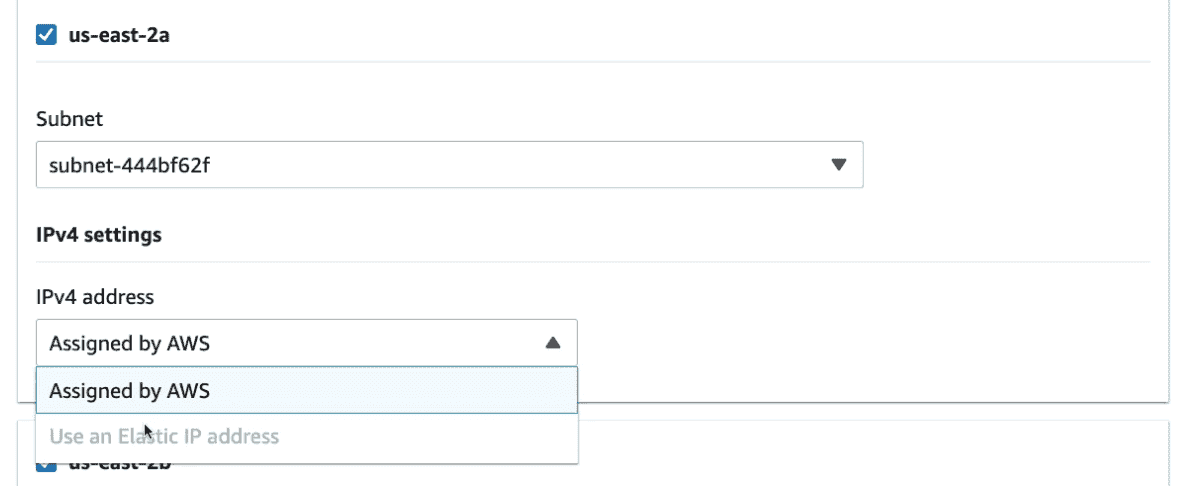
HostName + 1 IP/AVZ(EIP)
Usage
Retired
Microservice
High Performance Gaming
FireWall
1. Classic Load Balancer(v1)
Retiring and divided into NLB & ALB
Both Layer 4 & 7: TCP, HTTP, HTTPS
Cross Zone Load Balancing: Off by default(Free inter AZ if enabled)
📜 SSL: Support only one SSL Certificate per ELB
1 CLB support only 1 App & 1 SSL Certificate
Does not support SNI to support multiple SSL certificate.
📌 static DNS Host Name name, No static IP.
🩺 Health checkup : TCP or HTTP based
Limitations:
Multiple CLB needed for multiple Application
Does not support SNI: Multiple CLB need to for multiple SSL Certificate
2. Application Load Balancer ALB(v2)
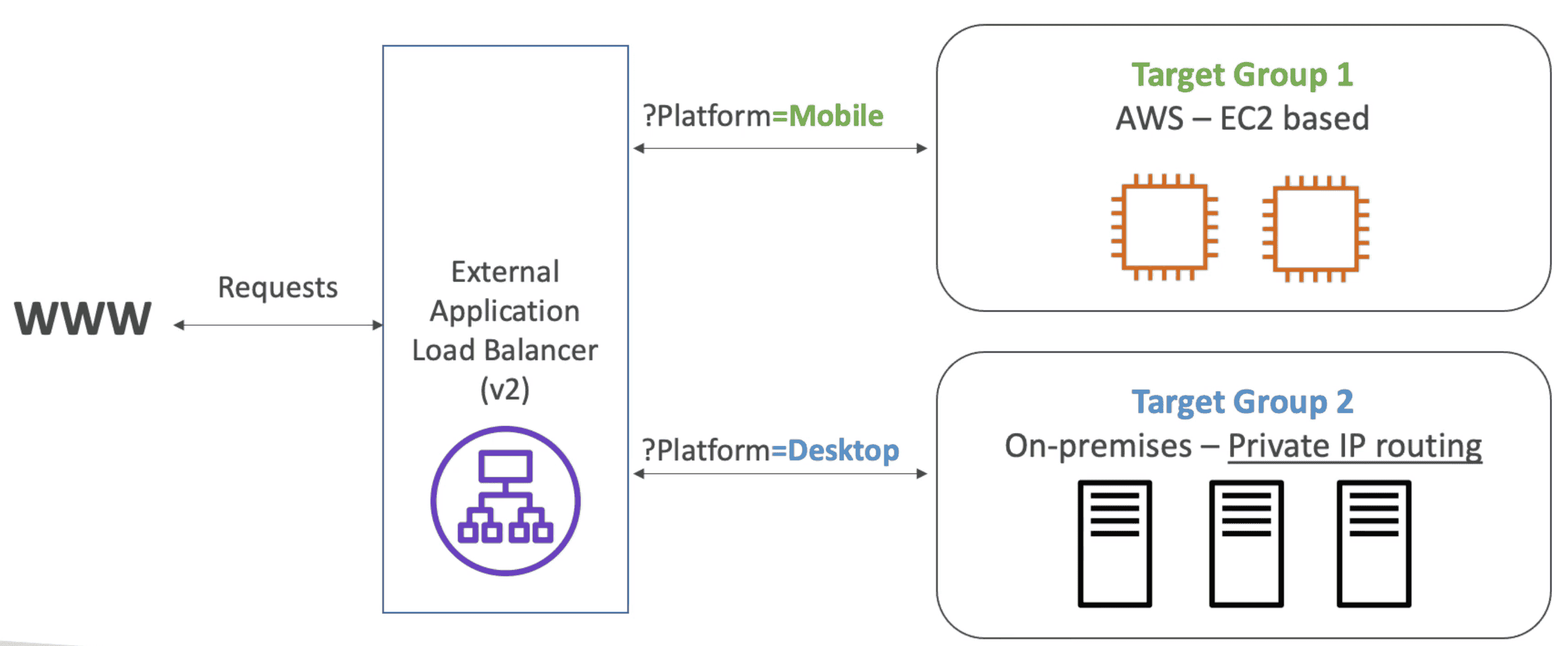
Route traffic to multiple HTTP/S applications across machines(target group)
Great fit for Microservices & docker based application ECS
Higher Latency than NLB (operates at Layer 7, more request processing overhead)
Layer 7 : HTTP/HTTPS, WebSocket
Cross Zone Load Balancing: Always On(Cant be disabled & Free inter AVZ)
📜 SSL: Use SNI to support multiple SSL Certificate with multiple Listener
📌 static DNS Host Name name, No static IP.
Application server communicate with ALB using private IPV4
Application server don't see the client IP directly & clients IP info is embedded into header of request from ALB:
X-Forwarded-Proto: Client Protocol
X-Forwarded-For: IP
X-Forwarded-Port: Port
ALB targets with instance ID route to primary private IP in primary NIC targets using IP addresses route to any
private IP from one or more NICs.
ALB Routing
Target Group
Group of EC2 instance with Health check
Support port mapping to redirect to dynamic port on EC2 instance.
Each target group can be an independent Microservice
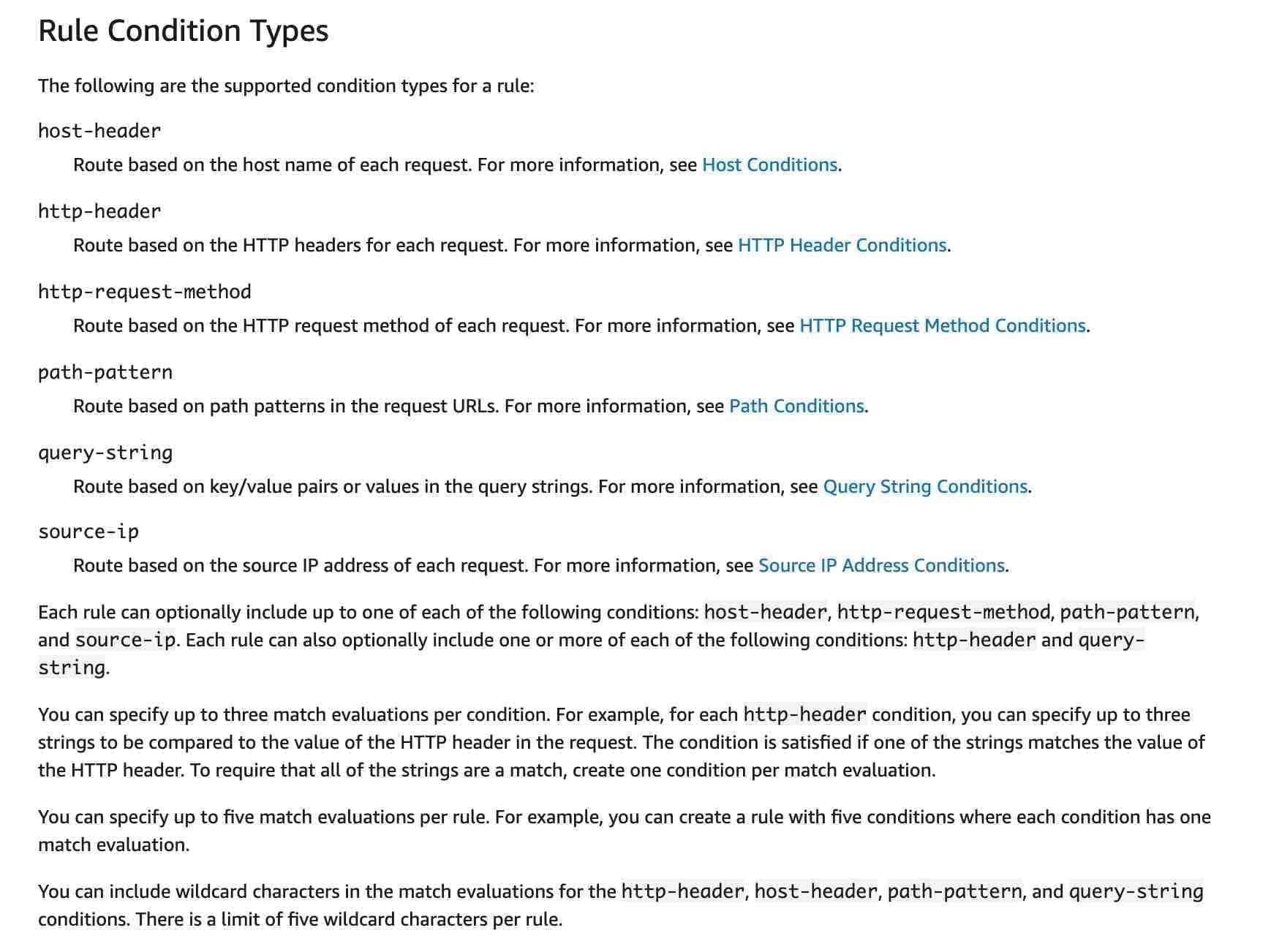
Can configure listener rules to route requests to different target groups based on the content of the application
traffic.
ALB Can route multiple URL to Multiple Target group and health check can be done on target group level