
NVIDIA Triton Inference Server: TensorRT-LLM, GPU Serving and Production AI Inference
NVIDIA Triton Inference Server and vLLM compared — PagedAttention and continuous batching mechanics, TensorRT-LLM vs vLLM vs Triton tradeoff table, when to use each for production LLM serving, and Kubernetes deployment patterns for both.
NVIDIA Triton Inference Server 🐳
Triton Inference Server is a high-performance model serving platform for deploying AI models in production.
It is designed for:
- scalable inference
- multi-model serving
- GPU acceleration
- low-latency AI APIs
- enterprise AI deployment
Triton can serve:
- LLMs
- computer vision models
- speech models
- recommendation systems
- ensemble pipelines
Why Triton Exists
Running AI models in production is difficult because of:
- batching
- GPU scheduling
- concurrency
- scaling
- memory management
- multi-model orchestration
Triton handles these automatically.
Myths about Triton
- Triton provides GPUs or hardware
- Triton is software only. It runs on hardware you already have (CPUs/GPUs).
- Triton is a model framework (like PyTorch)
- Triton does not train models. It only serves models for inference.
- Triton replaces TensorRT
- Triton can use TensorRT models, but it is a serving layer, not an optimizer.
- Triton works only with
TensorRTmodels
- Triton supports
TensorRT,ONNX,PyTorch,TensorFlow, and more.
- Triton automatically optimizes models
- Not exactly. Triton executes models efficiently, but model optimization must be done beforehand (e.g., with TensorRT).
Why Triton Matters
Modern AI systems need:
- high throughput
- low latency
- GPU efficiency
- scalable serving
- production observability
Triton provides all of these in a production-grade inference platform.
What Triton Does
Triton acts like:
Production web server for AI models
Instead of serving HTML pages:
- it serves model inference requests.
# Step 1: Create the example model repository
git clone -b r26.04 https://github.com/triton-inference-server/server.git
cd server/docs/examples
./fetch_models.sh

# Step 2: Launch triton from the NGC Triton container
docker run --gpus=1 --rm --net=host -v ${PWD}/model_repository:/models nvcr.io/nvidia/tritonserver:26.04-py3 tritonserver --model-repository=/models --model-control-mode explicit --load-model densenet_onnx

# Step 3: Sending an Inference Request
# In a separate console, launch the image_client example from the NGC Triton SDK container
docker run -it --rm --net=host nvcr.io/nvidia/tritonserver:26.04-py3-sdk /workspace/install/bin/image_client -m densenet_onnx -c 3 -s INCEPTION /workspace/images/mug.jpg

# Inference should return the following
Image '/workspace/images/mug.jpg':
    15.346230 (504) = COFFEE MUG
    13.224326 (968) = CUP
    10.422965 (505) = COFFEEPOT
High-Level Triton Workflow
flowchart TD

    A["Client Requests"]--> B["Triton Inference Server 🐳"]

    B --> C["TensorRT 🖲 / PyTorch / ONNX"]

    C --> D["NVIDIA GPUs 🧮"]

    D --> E["Inference Response 💬"]
Example: Triton + TensorRT-LLM
Modern LLM stack:
- TensorRT: Optimizes a model
- Triton: Serves optimized models at scale
flowchart TD
A["Client Requests 🙍🏻♂️"]--> B["Triton Server 🐳"]
B --> C["TensorRT-LLM 🖲"]
C --> D["NVIDIA GPUs 🧮"]
D --> E["Generated Tokens 💬"]
Triton APIs
Triton supports:
- HTTP
- gRPC
- streaming inference
Example:
import tritonclient.http as httpclient
Supported Backends
Triton supports many runtimes.
| Backend | Purpose |
|---|---|
| TensorRT | Optimized NVIDIA inference |
| PyTorch | TorchScript inference |
| ONNX Runtime | Cross-platform inference |
| TensorFlow | TensorFlow serving |
| Python backend | Custom Python logic |
| vLLM | Optimized LLM serving |
| TensorRT-LLM | High-performance LLM inference |
Triton vs Traditional APIs
| Feature | Traditional API Server | Triton |
|---|---|---|
| GPU-aware | NO | YES |
| Dynamic batching | NO | YES |
| Multi-model serving | Limited | Excellent |
| TensorRT integration | NO | Native |
| AI inference optimization | Limited | Excellent |
Triton Architecture
Triton Ecosystem
| Component | Role |
|---|---|
| CUDA | GPU compute |
| NCCL | Multi-GPU communication |
| TensorRT | Optimized inference |
| TensorRT-LLM | LLM optimization |
| Triton | Production serving |
| Kubernetes | Orchestration |
flowchart TD

    A["HTTP / gRPC Requests"]--> B["Triton Server 🐳"]
    B --> C["Scheduler 🕘"]
    C --> D["Model Backend"]
    D --> E["CUDA Runtime 📟"]
    E --> F["NVIDIA GPUs 🧮"]
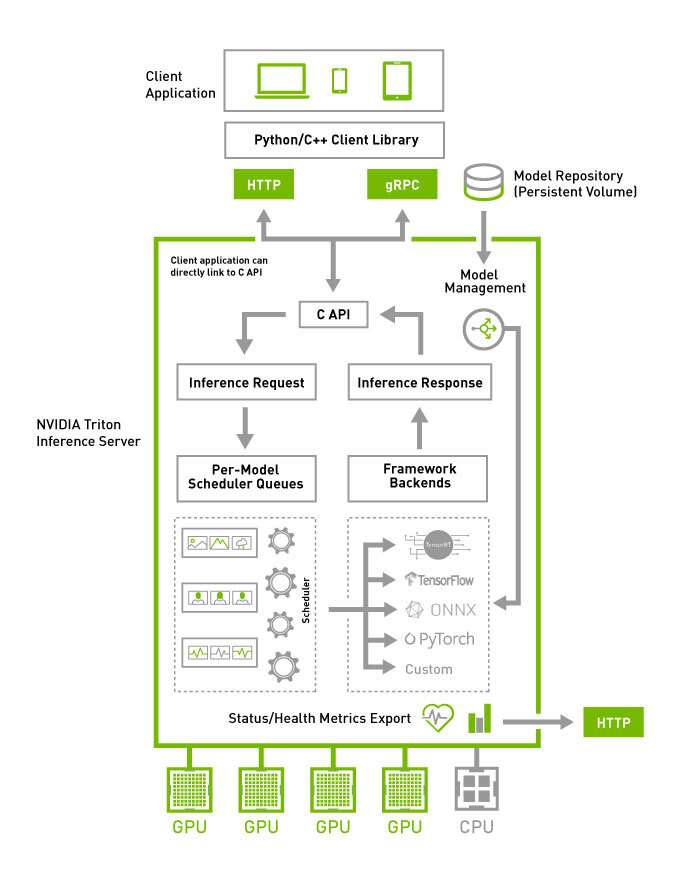
⏱️ Triton Scheduling
Triton optimizes:
- batching
- queueing
- GPU assignment
- parallel execution
- memory reuse
This helps maximize:
- throughput
- GPU utilization
- latency efficiency
🗂️ Dynamic Batching
One of Triton’s biggest features.
Instead of processing requests individually:
Request 1
Request 2
Request 3
Triton automatically combines them:
Single GPU batch
Benefits:
- higher GPU utilization
- better throughput
- lower cost
Dynamic Batching Example
flowchart LR

    A["Request 1 📒"]
    B["Request 2 📘"]
    C["Request 3 📕"]

    A --> D["Triton Dynamic Batch 🗂️"]
    B --> D
    C --> D

    D --> E["Single GPU Inference"]
🗃️ Model Repository
Triton loads models from a structured repository.
Example:
models/
 ├── llama/
 │    ├── 1/
 │    └── config.pbtxt
 ├── reranker/
 └── embedding_model/
📦 Concurrent Model Execution
Triton can run simultaneously:
- 🔢 Multiple models
- 🏷️ Multiple versions
- 🧮 Multiple GPUs
Example:
- recommendation model
- embedding model
- reranker
- LLM
all served together.
🔗 Ensemble Models
Triton can chain multiple models into pipelines.
Example:
flowchart TD

    A["Input Text"]--> B["Embedding Model"]
    B --> C["Retriever"]
    C --> D["LLM"]
    D --> E["Final Response"]
This is useful for:
- RAG systems
- multimodal AI
- AI agents
📊 Triton + Monitoring
Triton exposes:
- Prometheus metrics
- GPU metrics
- Latency metrics
- Throughput metrics
Important for:
- Observability
- Autoscaling
- Production reliability
Common Triton Use Cases
- LLM serving
- Chatbots
- RAG systems
- Recommendation engines
- Computer vision APIs
- Speech AI
- Real-time inference systems
Typical Production Stack
flowchart TD
    A["PyTorch / NeMo Model"]--> B["ONNX 📦"]
    B --> C["TensorRT-LLM  🖲"]
    C --> D["Triton Inference Server  🐳"]
    D --> E["Production APIs"]
Triton + Kubernetes
Triton is commonly deployed on:
- Kubernetes
- GPU clusters
- cloud AI platforms
Example stack:
flowchart TD

    A["Kubernetes ☸️"]--> B["Triton Pods 🐳"]
    B --> C["TensorRT-LLM  🖲"]
    C --> D["GPU Nodes 🧮"]
vLLM: The Open-Source Alternative
vLLM (UC Berkeley Sky Lab, 2023) is the dominant open-source LLM inference engine. It is Triton's primary alternative for LLM serving and the benchmark every production team compares against TRT-LLM.
Why vLLM Matters
Before vLLM, LLM inference had two problems:
- KV cache fragmentation — each sequence reserved a contiguous VRAM block for its full max-length KV cache, even if the actual sequence was short. 60–80% of VRAM was wasted on pre-allocation.
- Static batching — the server waited to fill a batch before processing. Short sequences held up the batch waiting for long ones to finish.
vLLM solved both with PagedAttention and continuous batching.
PagedAttention — How it Works
PagedAttention borrows the OS virtual memory concept: instead of allocating one contiguous KV cache block per sequence, VRAM is divided into fixed-size pages (~16 tokens each). Pages are allocated on demand as tokens are generated and freed immediately when a sequence finishes.
Traditional KV cache (pre-vLLM):
┌──────────────────────────────┐
│ Seq A  [████████░░░░░░░░░░░░] │  → 512-token slot, seq only 200 tokens → 60% wasted
│ Seq B  [██░░░░░░░░░░░░░░░░░░] │  → 512-token slot, seq only 80 tokens → 84% wasted
│ (fragmented, non-shareable)   │
└──────────────────────────────┘

PagedAttention (vLLM):
┌─────────────────────────────────────────┐
│ Page 0 │ Page 1 │ Page 2 │ Page 3 │ ... │
│ Seq A  │ Seq A  │ Seq B  │ Seq C  │     │
│ (pages allocated as tokens generated)   │
│ (freed immediately on sequence end)     │
└─────────────────────────────────────────┘
Result: ~55% more sequences can run concurrently in the same VRAM budget. For shared prefix prompts (e.g., a system prompt used by all users), pages are copy-on-write shared — one physical page serves thousands of requests.
Continuous Batching
vLLM uses iteration-level scheduling: instead of waiting for all sequences in a batch to finish (static batching), the scheduler runs one decode step at a time and inserts new requests as soon as a slot opens.
Static batching:          Continuous batching (vLLM):
t=0: [A, B, C, D]        t=0: [A, B, C, D]
t=1: [A, B, C, D]        t=1: [A, B, C, E]  ← E inserted as D finishes
t=2: [A, B, C, D]        t=2: [A, B, F, E]  ← F inserted as C finishes
t=3: [A, B, C, D]        ...GPU never idles waiting for stragglers
t=4: done → next batch
GPU stays at maximum utilization. Throughput improves 2–10× for mixed-length workloads.
vLLM Key Features
| Feature | Detail |
|---|---|
| PagedAttention | OS-style paged KV cache; ~55% VRAM savings; copy-on-write prefix sharing |
| Continuous batching | Iteration-level scheduling; no static batch wait |
| OpenAI-compatible API | Drop-in replacement — same /v1/completions, /v1/chat/completions endpoints |
| Quantization | AWQ, GPTQ, INT4, INT8, FP8 — load quantized HuggingFace checkpoints directly |
| Speculative decoding | Draft model generates tokens; target model verifies in parallel |
| Multi-GPU | Tensor parallelism via --tensor-parallel-size N |
| Hardware | NVIDIA (CUDA), AMD (ROCm), Google TPU, CPU (slow) |
| Model support | Any HuggingFace model — Llama, Mistral, Qwen, Gemma, Phi, Falcon, Mixtral MoE |
| Structured output | JSON schema enforcement, guided decoding |
Running vLLM
# Install
pip install vllm

# Serve Llama 3.1 8B on 1 GPU — OpenAI-compatible API on :8000
python -m vllm.entrypoints.openai.api_server \
  --model meta-llama/Meta-Llama-3.1-8B-Instruct \
  --tensor-parallel-size 1 \
  --max-model-len 8192 \
  --gpu-memory-utilization 0.90

# Client — identical to OpenAI SDK
from openai import OpenAI
client = OpenAI(base_url="http://localhost:8000/v1", api_key="none")
response = client.chat.completions.create(
    model="meta-llama/Meta-Llama-3.1-8B-Instruct",
    messages=[{"role": "user", "content": "Explain PagedAttention"}]
)
# Multi-GPU — 70B model across 4 GPUs (tensor parallel)
python -m vllm.entrypoints.openai.api_server \
  --model meta-llama/Meta-Llama-3.1-70B-Instruct \
  --tensor-parallel-size 4 \
  --dtype bfloat16
vLLM on Kubernetes
apiVersion: apps/v1
kind: Deployment
metadata:
  name: vllm-llama3
  namespace: inference
spec:
  replicas: 2
  selector:
    matchLabels:
      app: vllm-llama3
  template:
    spec:
      containers:
        - name: vllm
          image: vllm/vllm-openai:latest
          args:
            - --model=meta-llama/Meta-Llama-3.1-8B-Instruct
            - --tensor-parallel-size=1
            - --gpu-memory-utilization=0.90
          ports:
            - containerPort: 8000
          resources:
            limits:
              nvidia.com/gpu: "1"
          env:
            - name: HF_TOKEN
              valueFrom:
                secretKeyRef:
                  name: hf-token
                  key: token
vLLM vs TensorRT-LLM vs Triton
These three are at different layers and are often combined, not mutually exclusive:
| vLLM | TensorRT-LLM | Triton Inference Server | |
|---|---|---|---|
| What it is | LLM inference engine | NVIDIA LLM compiler + runtime | Multi-model serving platform |
| Layer | Inference engine | Compiler + inference kernel | Serving frontend |
| Created by | UC Berkeley / vLLM Project | NVIDIA | NVIDIA |
| Hardware | NVIDIA, AMD, CPU, TPU | NVIDIA only | Any (via backends) |
| Setup complexity | Low — pip install vllm | High — compile engine per GPU/config | Medium — model repo + config.pbtxt |
| Latency | Good (Flash Attention 2, CUDA graphs) | Best — highest NVIDIA hardware utilization | Depends on backend |
| Throughput | Excellent (PagedAttention + continuous batching) | Excellent (FP8, WGMMA, TMA) | Excellent (dynamic batching) |
| Model loading | Any HuggingFace checkpoint directly | Requires offline compilation step | Pre-compiled TRT engine or HF weights |
| Quantization | AWQ, GPTQ, INT8, FP8 (load-time) | FP8, INT8, INT4 (compile-time) | Via backend |
| KV cache | PagedAttention (paged, no fragmentation) | Manual chunked KV | Via backend |
| Multi-GPU | Tensor parallel via CLI flag | Tensor + pipeline parallel | Via backend |
| OpenAI API | Built-in (/v1/chat/completions) | No — raw C++ / Python binding | Via HTTP/gRPC endpoint |
| Batching | Continuous (iteration-level) | Continuous (in-flight batching) | Dynamic batching |
| Speculative decoding | Yes | Yes | Via backend |
| MoE models (Mixtral) | Yes (expert parallelism) | Yes | Via backend |
| Production maturity | High (Anyscale, Mistral, Cursor) | High (NVIDIA NIM, DGX Cloud) | High (NVIDIA enterprise) |
| NIM uses it? | No (NIM = TRT-LLM + Triton) | Yes — core NIM backend | Yes — NIM serving layer |
| Best for | Open-source deployment, multi-cloud, dev velocity | Maximum performance on NVIDIA fleet | Multi-model serving, RAG pipelines, enterprise |
How They Combine
flowchart TD
    Client["Client Request"] --> Triton["Triton Inference Server\n(serving + batching + routing)"]
    Triton --> TRTLLM["TensorRT-LLM backend\n(NVIDIA-compiled, highest perf)"]
    Triton --> vLLMB["vLLM backend\n(easier model loading)"]
    TRTLLM --> GPU["NVIDIA GPU"]
    vLLMB --> GPU

    Client2["Client Request"] --> vLLM["vLLM\n(self-contained — engine + API server)"]
    vLLM --> GPU2["NVIDIA / AMD GPU"]
NIM = Triton + TRT-LLM backend, pre-packaged with optimized profiles per GPU type.
When to Use Which
| Situation | Recommendation |
|---|---|
| You want the highest tokens/sec on H100 and can accept compilation time | TensorRT-LLM (or NIM which wraps it) |
| You need to serve 10+ different models from one server | Triton (multi-model serving) |
| You want fastest path to production with a HuggingFace model | vLLM — pip install vllm, done |
| You're on AMD/ROCm or need hardware flexibility | vLLM |
| You need RAG pipeline (embedding + reranker + LLM) as one endpoint | Triton ensemble |
| You're building DGX Cloud production workloads | NIM (TRT-LLM + Triton) |
| You want OpenAI-compatible API with zero config | vLLM |
| Your org uses NVIDIA enterprise support | Triton + TRT-LLM or NIM |
Related Posts
- NVIDIA NIM: Optimized Inference Microservices — NIM uses Triton as its backend; NIM profiles pre-select the TRT-LLM Triton backend for each GPU type
- TensorRT and High-Performance AI Inference — the TensorRT-LLM backend that Triton loads for LLM inference; explains the compilation pipeline
- Flash Attention: Fast Memory-Efficient Attention — PagedAttention (vLLM) and Flash Attention (SRAM tiling) solve different problems; both are needed for production LLM serving
- Fine-Tuning LLMs: LoRA, QLoRA, PEFT — fine-tuned checkpoints are loaded into vLLM or TRT-LLM for serving
- Optimizing AI Inference at Scale — continuous batching, KV cache, and tensor parallelism in the context of Triton and vLLM at production scale
- GPU Autoscaling: KEDA, HPA, Cluster Autoscaler — scaling Triton/vLLM-backed deployments based on GPU utilization and request queue depth
