
AI Infra Networking: GPU Clusters, InfiniBand, RoCE, and DPU Integration
Networking fundamentals for AI-centric data centers — the four network planes, DMA and RDMA mechanics, InfiniBand vs RoCE vs Ethernet with real numbers, the GPU interconnect hierarchy from PCIe through NVLink/NVSwitch to InfiniBand, BlueField DPUs, and how the GPU and Network Operators automate all of it on Kubernetes.
AI Infra Networking
A single misconfigured network fabric is the difference between a cluster of H100s training a model in two days and the same hardware taking twenty.
AI workloads need ultra-low latency, high bandwidth, and deterministic performance across every node simultaneously — and unlike a typical web service, a stalled network isn't a slow request, it's an entire distributed training job stalling on one straggler.
Networking in an AI data center has to support four very different jobs at once:
- GPU-to-GPU communication for collective operations
- Storage access for dataset streaming and
- Checkpointing, cluster management traffic, and
- Infrastructure monitoring
each with different latency, bandwidth, and reliability requirements, which is why AI data centers don't run all of it over one network.
Latency vs Throughput
| Latency | Throughput | |
|---|---|---|
| Definition | Time for a single data transfer to complete | Total data moved per second |
| Matters most for | Real-time inference, cross-GPU synchronization (AllReduce) | Large distributed training, checkpointing, dataset streaming |
| Dominated by | Physical distance, protocol overhead, CPU involvement | Link speed, number of parallel paths |
Distributed training needs both simultaneously:
- low latency so a collective operation (AllReduce) doesn't stall waiting on the slowest link
- high throughput so gradients for a 70B-parameter model actually move in a useful amount of time.
The stack that provides this — NCCL, RDMA, InfiniBand, NVLink — is covered end to end below.
Network Separation — Four Planes
AI data centers physically or logically separate traffic into distinct planes, each engineered for a different priority:
flowchart LR

    subgraph Compute["1. Compute Network"]
        direction LR
        C1["GPU-to-GPU <br/> InfiniBand / RoCE / NVLink"]
    end

    subgraph InBand["2. In-Band Management"]
        direction LR
        I1["SSH, Slurm, Kubernetes, DNS <br/> cluster control traffic"]
    end

    subgraph OutOfBand["3. Out-of-Band Management"]
        direction LR
        O1["IPMI / Redfish <br/> power control, remote console"]
    end

    subgraph Storage["4. Storage Network"]
        direction LR
        S1["NVMe-oF, Lustre, BeeGFS <br/> dataset + checkpoint I/O"]
    end
| Plane | Priority | Technologies | Fails how |
|---|---|---|---|
| Compute | Ultra-low latency, high throughput | InfiniBand, RoCE, NVLink (intra-node) | A slow link stalls every rank's AllReduce, not just one job |
| In-band management | Reliability, availability | SSH, Slurm, Kubernetes control plane, DNS | Job scheduling and cluster ops degrade, training traffic unaffected |
| Out-of-band management | Always-on, independent of host power state | IPMI, Redfish | Loses remote recovery ability — can't power-cycle a hung node remotely |
| Storage | High bandwidth, low contention | NVMe-oF, Lustre, BeeGFS, often RDMA-backed | Training stalls waiting on data, not on compute |
Separating these means a burst of kubectl get pods traffic or a Slurm heartbeat never competes with an AllReduce for the same wire, and — critically — the out-of-band network stays reachable even if a node's OS has completely hung, which is the only way to remotely power-cycle it.
DMA and RDMA — Bypassing the CPU
Direct Memory Access (DMA) lets a device move data to/from memory without the CPU copying every byte.
RDMA (Remote Direct Memory Access) extends this across the network — one host's NIC writes directly into a remote host's memory, without either CPU touching the data.
flowchart LR

    subgraph Traditional["Traditional Networking"]
    direction TB
    T1["NIC receives packet"]-->T2["CPU interrupt"]
    T2-->T3["CPU copies to kernel buffer"]
    T3-->T4["CPU copies to user buffer"]
    end

    subgraph RDMAFlow["RDMA"]
    direction TB
    R1["NIC receives packet"]-->R2["NIC writes directly <br/> to application memory"]
    end
| Traditional (TCP/IP) | RDMA | |
|---|---|---|
| CPU involvement | Copies data at every hop, handles interrupts | Bypassed entirely for the data path |
| Latency | Higher — kernel/user-space copies add up | Lower — direct memory-to-memory |
| CPU utilization | Scales with network traffic | Stays flat regardless of traffic volume |
| Typical use | General networking | GPU-to-GPU, storage access in HPC/AI clusters |
GPUDirect RDMA
Takes RDMA one step further — the RDMA transfer goes directly between GPU memory on one host and GPU memory (or a NIC) on another, without ever staging through host system RAM at all:
# Benchmark raw RDMA bandwidth between two nodes (perftest tools)
ib_write_bw -d mlx5_0 -a          # server
ib_write_bw -d mlx5_0 -a <server_ip>   # client

# Confirm GPUDirect RDMA is actually being used (not falling back through host memory)
nvidia-smi topo -m                # look for "PIX"/"PHB" vs "SYS" between GPU and NIC
nvidia-smi topo -m's output matters here — GPUDirect RDMA only engages its fast path when the GPU and NIC share a PCIe root complex or are connected via NVLink; a SYS topology (crossing a CPU socket / QPI link) silently falls back to a slower path even though RDMA is technically still in use.
InfiniBand vs RoCE vs Ethernet
flowchart TD
    Ethernet["Ethernet + TCP/IP <br/> ~10-100 µs, CPU-heavy"]
    RoCE["RoCE <br/> RDMA over Ethernet"]
    InfiniBand["InfiniBand <br/> ~1-2 µs, native RDMA"]

    Ethernet-->|"add RDMA verbs"| RoCE
    RoCE-->|"dedicated fabric + HCAs"| InfiniBand
| Ethernet | RoCE | InfiniBand | |
|---|---|---|---|
| Typical latency | 10–100 µs | 2–5 µs | 1–2 µs |
| CPU involvement | Full TCP/IP stack | Bypassed via RDMA verbs | Bypassed via native RDMA |
| Hardware | Commodity NICs | RDMA-capable NICs (ConnectX) | HCAs + dedicated switches |
| Requires lossless fabric? | No | Yes — PFC/ECN configured | No — credit-based flow control is native |
| Cost | Lowest | Mid | Highest |
| Managed by | Standard switching | Standard switching + DCB config | Subnet Manager (SM) |
| Used in | General enterprise | Enterprise AI clusters | 50%+ of top HPC/AI clusters |
The detail that trips people up: RoCE only performs well on a lossless Ethernet fabric — it needs Priority Flow Control (PFC) and ECN configured on every switch in the path, because RDMA has none of TCP's retransmission tolerance built in.
Skip that configuration and RoCE will run, just with the packet-loss-driven stalls a badly-tuned Ethernet fabric produces under load.
InfiniBand avoids this entirely because credit-based flow control (no packet loss by design) is native to the fabric, managed cluster-wide by an Open Subnet Manager (SM) rather than per-switch configuration.
- NVIDIA Quantum-X800 — InfiniBand switch for large-scale AI clusters
- NVIDIA Spectrum switches + BlueField DPUs — the RoCE-based Ethernet alternative
GPU Interconnects — The Compute Fabric
Moving from the network between nodes to the fabric inside and between GPUs themselves, bandwidth increases by roughly an order of magnitude at each step closer to the GPU:
flowchart TD

    PCIe["PCIe <br/> 16-32 GB/s <br/> CPU ↔ GPU, GPU ↔ NIC"]
    NVLink["NVLink <br/> 600-900 GB/s <br/> GPU ↔ GPU, same node"]
    NVSwitch["NVSwitch <br/> non-blocking fabric <br/> all GPUs in a node"]
    IB["InfiniBand / RoCE <br/> node ↔ node"]

    PCIe-->NVLink-->NVSwitch-->IB
| Interconnect | Scope | Bandwidth | Notes |
|---|---|---|---|
| PCIe | CPU↔GPU, GPU↔NIC | 16–32 GB/s (Gen4/5) | The fallback path when NVLink isn't available; a real bottleneck for multi-GPU scaling |
| NVLink | GPU-to-GPU, same node | 600 GB/s (NVLink 3.0, A100) → 900 GB/s (NVLink 4.0, H100) | Direct chip-to-chip, bypasses PCIe entirely |
| NVSwitch | All GPUs in a node | Non-blocking at full NVLink bandwidth | What lets all 8 GPUs in a DGX H100 talk to each other at full NVLink speed simultaneously, not just pairwise |
| GPUDirect RDMA | GPU-to-GPU or GPU-to-NIC, across nodes | Line-rate of the underlying fabric | No CPU involvement, no staging through host RAM |
| GPUDirect Storage | Storage ↔ GPU memory, within a host | Line-rate of the storage fabric | Bypasses system memory and CPU for dataset loading straight into GPU memory |
Each step up this hierarchy exists because the one below it becomes the bottleneck at scale
PCIecan't keep 8 GPUs fed- So
NVLinkconnects pairs directly- But pairwise
NVLinkcan't give every GPU full bandwidth to every other GPU
- But pairwise
- So
NVSwitchmakes it non-blocking- But
NVSwitchonly covers one node
- But
- So
InfiniBand/RoCEplusGPUDirect RDMAextends the same low-CPU-overhead model across the whole cluster.
This exact hierarchy is what NCCL selects between automatically at runtime for each collective operation.
DPUs — Offloading the Data Center Fabric
A Data Processing Unit (DPU) — NVIDIA's BlueField line — is a SmartNIC with its own ARM CPU cores, running a full Linux userspace, sitting between the host and the network:
flowchart TD

    Host["Host CPU <br/> (runs tenant workload only)"]
    Host<-->BlueField["BlueField DPU <br/> ARM cores + programmable datapath"]
    BlueField<-->Network["Network Fabric <br/> InfiniBand / RoCE"]

    BlueField-.->|"offloads"| Offload["Networking, storage virtualization, <br/> security/isolation, RDMA processing"]
The point of a DPU is moving infrastructure work off the host CPU entirely, onto the DPU's own cores:
| Function | Traditionally runs on | Offloaded to the DPU |
|---|---|---|
| Network virtualization, RoCE/RDMA processing | Host CPU | BlueField ARM cores |
| Storage virtualization (NVMe-oF initiator/target) | Host CPU | BlueField ARM cores |
| Security isolation between tenants | Host CPU / hypervisor | BlueField, with a hard hardware boundary from the tenant |
| Telemetry and monitoring agents | Host CPU | BlueField, invisible to the tenant workload |
In a multi-tenant AI cluster this matters twice over:
- Every CPU cycle spent on network/storage plumbing on the host is a cycle not available to the tenant's actual training job, and
- Running that plumbing on a physically separate set of cores means a compromised tenant workload can't touch the infrastructure control plane at all
It give a much stronger isolation boundary than a hypervisor running on the same CPU as the guest it's isolating.
GPU & Network Management with Kubernetes Operators
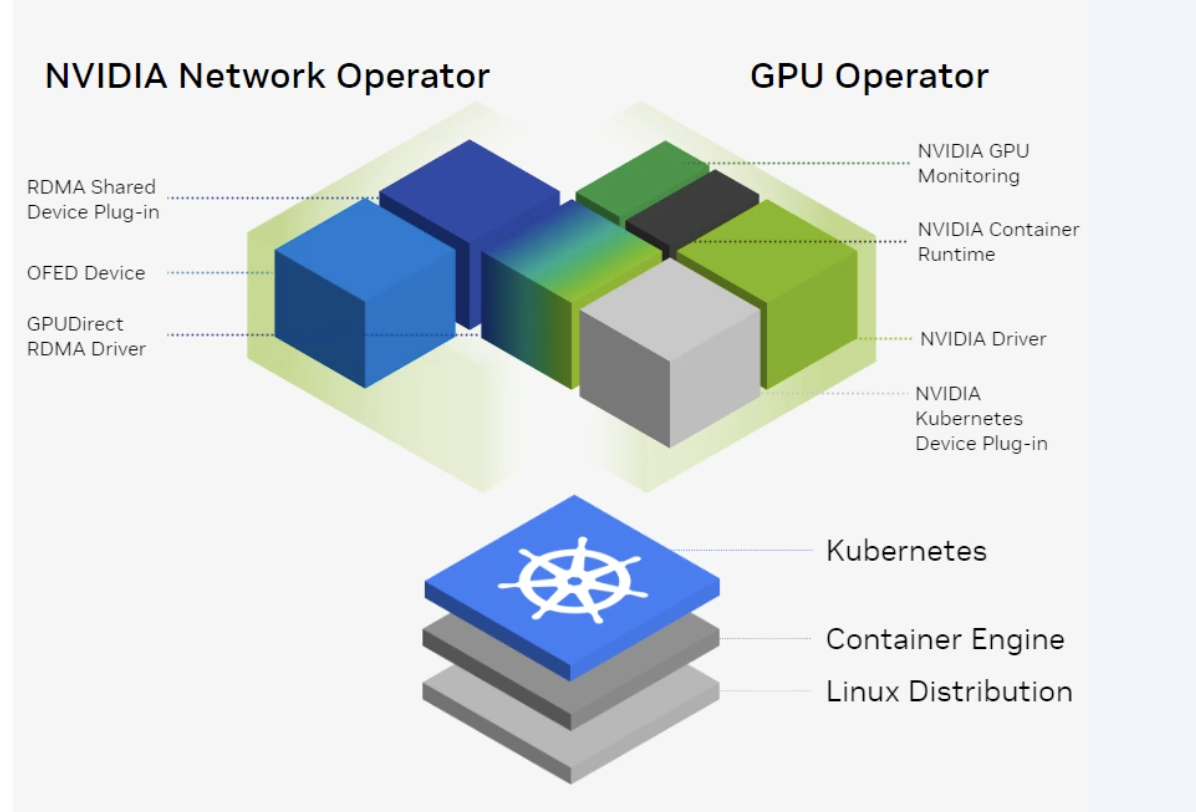
Bringing this hardware stack under Kubernetes is what the GPU Operator and Network Operator automate — this post owns the underlying hardware concepts; the full Kubernetes-side automation (CRDs, DaemonSets, real manifests) is its own dedicated post below.
Both Nvidia Operator exploit the Operator Pattern in Kubernetes
Operator Pattern
Operators are software extensions to Kubernetes that make use of custom resources to manage applications and their components.
Operators follow Kubernetes principles, notably the control loop.
There are tons of Operators available on Kubernetes on https://operatorhub.io/
But for Nvidia Infrastructure on k8 These 2 Operators add Hardware capabilities
NVIDIA GPU Operator
- Automates NVIDIA driver installation, the NVIDIA Container Runtime, the Kubernetes device plugin, and GPU monitoring (DCGM) across every node
- Sits on top of Kubernetes so GPU resources are discovered, exposed, and kept healthy without per-node manual setup
NVIDIA Network Operator
- Manages InfiniBand/RoCE resources (MLNX OFED drivers, the RDMA shared device plugin, the NVIDIA peer memory driver) the same way the GPU Operator manages GPUs
- Works alongside the GPU Operator so a Pod requesting both a GPU and high-speed networking gets both automatically wired together
Key Takeaways
| Concept | Summary |
|---|---|
| Four network planes | Compute, in-band management, out-of-band management, storage — separated so none compete with each other under load |
| DMA / RDMA | Bypasses the CPU for data movement; RDMA extends this across hosts, GPUDirect RDMA extends it directly between GPUs |
| InfiniBand vs RoCE vs Ethernet | Same RDMA idea, different fabric — InfiniBand is natively lossless; RoCE needs PFC/ECN configured to avoid packet-loss stalls |
| PCIe → NVLink → NVSwitch → InfiniBand | Each layer exists because the one below it becomes the bottleneck at the next scale of GPU count |
| GPUDirect Storage | Loads datasets straight from storage into GPU memory, bypassing system memory and CPU |
| BlueField DPU | Offloads networking, storage virtualization, and tenant isolation onto separate ARM cores, freeing host CPU and hardening the isolation boundary |
| GPU Operator / Network Operator | Automate this entire hardware stack under Kubernetes — drivers, device plugins, RDMA resources, monitoring |
Every layer of this stack exists for the same reason: keep the CPU out of the data path. PCIe still needs it, NVLink and NVSwitch remove it inside a node, GPUDirect RDMA removes it across nodes, and a BlueField DPU removes it from the infrastructure plane entirely — the throughline of AI networking is that the fastest path is always the one the CPU never touches.
Related Posts
- NVIDIA Network Operator — the Kubernetes software stack built on top of this hardware: how InfiniBand, SR-IOV, RDMA, and Multus CNI are automated for GPU Pods
- Multi-Node Distributed Training on Kubernetes — why this networking stack exists: AllReduce between DGX nodes at hundreds of GB/s
- NCCL and Distributed GPU Communication — the library that selects between NVLink, NVSwitch, InfiniBand, and RoCE at runtime
- Kubernetes Topology Manager: NUMA-Aware GPU Scheduling — ensures the GPU and its InfiniBand NIC land on the same NUMA node for minimum-latency RDMA
- Slurm: The HPC Workload Manager Behind AI Training Clusters — topology-aware job placement on exactly this fabric
