
NVIDIA Base Command Manager: Provisioning and Operating GPU Clusters
How NVIDIA Base Command Manager (BCM) operates an entire GPU cluster — bare metal provisioning and node imaging, the head node vs compute node architecture, Slurm and Kubernetes workload manager integration, user and group management, the cmsh CLI and REST API, and how BCM, DCGM, and SMI fit together at different layers of the stack.
Slurm: The HPC Workload Manager Behind AI Training Clusters
NVIDIA DCGM: GPU Health, Diagnostics, and Prometheus Metrics
NVIDIA Base Command Manager: Provisioning and Operating GPU Clusters
DCGM answers "how healthy is this GPU?". NVIDIA Base Command Manager (BCM) answers a much bigger question: "how is an entire cluster of GPU nodes — bare metal, OS, workload manager, users, and monitoring — being provisioned and operated?" It's the platform layer that exists before there's a Kubernetes cluster or a Slurm queue to schedule anything onto.
- BCM Official Docs
Purpose
Manage and operate large GPU clusters used for AI and HPC workloads — from imaging bare metal nodes for the first time through day-2 operations across hundreds of them.
Capabilities
- Cluster provisioning — image and configure an entire fleet of GPU nodes in a data center from bare metal
- Job scheduling and monitoring — deploys and manages the workload manager (Slurm, Kubernetes, or Univa Grid Engine) on top of the provisioned nodes
- Multi-team / multi-user / multi-environment management — users, groups, quotas, and access control across the cluster
- Scale-aware resource allocation — ensures nodes, GPUs, and queues stay optimally utilized as the cluster grows
- REST API and CLI — every operation available in the web UI is scriptable
Operates At
Cluster and platform layer — one level above where DCGM and SMI live.
flowchart TD

  BCM[BCM<br/>Cluster Management <br/>Scheduling & Operations]
  BCM-->DCGM[DCGM <br/>GPU Monitoring <br/> Health & Diagnostics]
  DCGM-->SMI[NVIDIA SMI <br/>Per-Node GPU Metrics]
| Tool | Scope | Primary Purpose |
|---|---|---|
| SMI | Single GPU Server | Diagnostics and real-time status |
| DCGM | GPU Fleet / Cluster | Health monitoring, metrics, alerting |
| BCM | Entire AI Cluster | Cluster operations and resource management |
BCM doesn't replace DCGM — it sits above it. A BCM-managed cluster still runs DCGM on every GPU node for health telemetry;
BCM's own monitoring layer (CMDaemon) aggregates that alongside node-level metrics, job manager state, and its own dashboards.
Head Node vs Compute Nodes
BCM's architecture centers on one (or a redundant pair of) head node, which is the only node an administrator directly manages — everything else is provisioned and kept in sync from there.
flowchart LR

    Admin["Administrator <br/> cmsh / cmgui / REST API"]
    Admin-->Head["Head Node <br/> CMDaemon"]

    Head-->|"PXE boot + node image"| Compute1["Compute Node 1 <br/> (GPU)"]
    Head-->|"PXE boot + node image"| Compute2["Compute Node 2 <br/> (GPU)"]
    Head-->|"PXE boot + node image"| ComputeN["Compute Node N <br/> (GPU)"]

    Compute1-->|"metrics"| Head
    Compute2-->|"metrics"| Head
    ComputeN-->|"metrics"| Head
The head node runs CMDaemon, BCM's management daemon — it holds the cluster's configuration database, serves node images over the network, and is the single point every cmsh/cmgui command and REST API call talks to.
Compute nodes are typically stateless: they PXE-boot, pull a software image from the head node, and can be re-imaged rather than manually patched when something drifts.
Node Provisioning Flow
1. New bare-metal node powers on, PXE-boots
2. Head node's DHCP/PXE service hands it a boot image
3. Node pulls its assigned software image (OS + drivers + CUDA + agents)
4. CMDaemon on the node registers with the head node
5. Node appears in cmsh/cmgui as "UP", ready for jobs
Re-imaging a node — after a driver upgrade, a suspected config drift, or hardware service — is the same flow triggered on demand, which is what makes fleet-wide driver or CUDA version bumps a single operation instead of hundreds of manual SSH sessions.
Workload Manager Integration
BCM doesn't schedule jobs itself — it provisions and manages whichever workload manager the cluster actually uses, keeping its configuration in sync across all nodes as they're added or re-imaged:
| Workload Manager | Typical Use Case |
|---|---|
| Slurm | Traditional HPC/AI batch training, gang scheduling, multi-node MPI jobs |
| Kubernetes | Containerized inference and cloud-native ML pipelines |
| Univa Grid Engine (UGE) | Legacy HPC batch scheduling |
A single BCM-managed cluster can run more than one of these on different node groups — a common pattern is Slurm for a training partition and Kubernetes for an inference partition, both provisioned and monitored from the same head node.
cmsh — The BCM CLI
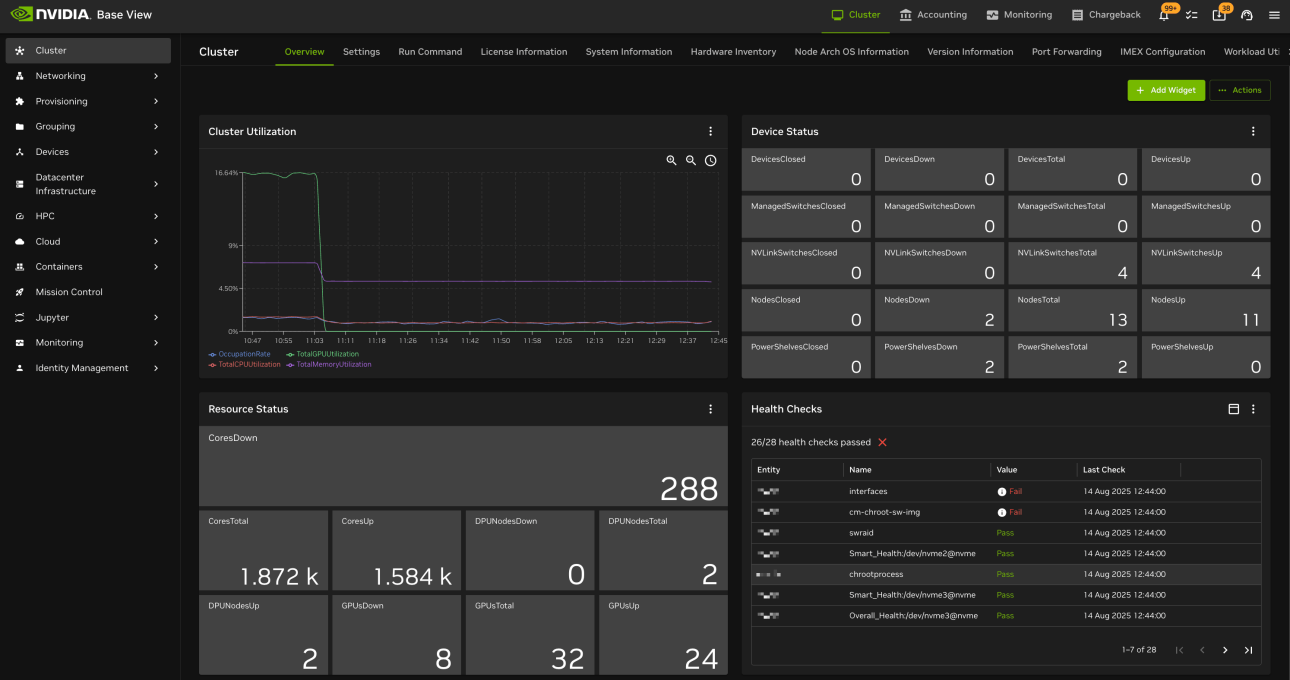
cmsh is BCM's interactive management shell — the same operations available in the web UI (Base View), scriptable:
# Enter the cluster management shell
cmsh

# List all nodes and their status
cmsh -c "device list"

# Check GPU health across the fleet (BCM shells out to DCGM/nvidia-smi per node)
cmsh -c "device; foreach * (get gpuinfo)"

# Reboot a specific node
cmsh -c "device use node001; reboot"

# Reimage a node with an updated software image
cmsh -c "device use node001; set softwareimage gpu-image-v2; commit"
Everything cmsh can do is also exposed over BCM's REST API, which is what CI/CD pipelines and higher-level orchestration tools use to trigger cluster operations programmatically rather than through an interactive shell.
Users, Groups, and Quotas
BCM centralizes identity and quota management across the whole cluster rather than leaving it per-node:
- User and group accounts, synced to every node
- Per-user or per-group resource quotas (GPU-hours, storage, job priority)
- Role-based access control for who can provision, reboot, or reimage nodes vs who can only submit jobs
This is the layer that answers "who is allowed to use how much of this cluster" — a question DCGM and SMI have no concept of, since they only see hardware, not organizational structure.
Key Takeaways
| Concept | Summary |
|---|---|
| Head node / CMDaemon | The single management point; holds cluster config and serves node images |
| Compute nodes | Typically stateless — PXE-boot and pull a software image rather than being manually configured |
| Provisioning | Bare-metal imaging, re-imaging on demand for driver/CUDA upgrades or drift fixes |
| Workload manager integration | BCM provisions and manages Slurm, Kubernetes, or UGE — it doesn't replace them |
| cmsh / REST API / Base View | Three interfaces onto the same cluster operations — CLI, script/automation, and web UI |
| Users, groups, quotas | Centralized identity and resource allocation across the entire cluster |
| vs DCGM / SMI | BCM operates the cluster; DCGM monitors GPU fleet health; SMI is single-node diagnostics — each is a different altitude on the same stack |
BCM's real job is making a thousand-GPU cluster behave like one thing to operate — a node failing hardware validation gets pulled and re-imaged the same way it was provisioned in the first place, and a driver upgrade is one
cmshcommand instead of a fleet of individually-patched machines slowly drifting out of sync with each other.
Related Posts
- NVIDIA DCGM: GPU Health, Diagnostics, and Prometheus Metrics — the GPU-fleet health layer BCM aggregates on top of
- AI/ML Operations & GPU Observability — where BCM fits alongside SMI and DCGM in the broader monitoring and operations stack
- GPU Scheduling on Kubernetes — the scheduler-level view when Kubernetes is the workload manager BCM provisions
- HPC at Scale on Kubernetes — Slurm vs Kubernetes as workload managers, and where each fits on a BCM-provisioned cluster
- Kueue: Batch Job Scheduling — Kubernetes-native queueing, for clusters where BCM provisions Kubernetes rather than Slurm
